 ican
For those in hurry, download [download#13#nohits] now.
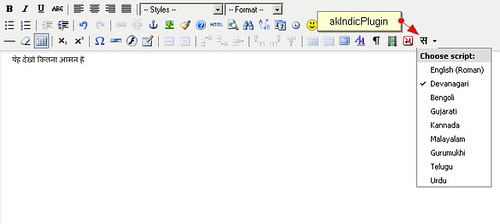
akIndicPlugin was born, when I needed to demo a website in Hindi. This plugin is adapted from a WordPress plugin Indic by nbachiyski, which is is actually based on Gamabhana library written by Omkar Joshi.
I adapted it so that I can use it in my websites.
As it is based on Gamabhana, it currently supports following 8 Indian languages
- Devanagari(Hindi)
- Bengoli
- Gujarati
- Kannada
- Malayalam
- Gurumukhi
- Telgu
- Urdu
It is released under GPL, so go ahead and use it as you see fit in your web application. Writing in India languages could not get easier then this.
How To Use
Copy the files in plugin directory of your tinyMCE folder and when you are initializing tinyMCE just add akIndicPlugin to list of plugins to load and also to list of buttons.
For example
tinyMCE.init({
		theme : "advanced",
		language : "en",
		mode : "specific_textareas",
		safari_warning : false,
		plugins : "advlink, advimage,  preview, visualchars, media, nonbreaking, akIndicPlugin",
		theme_advanced_buttons3_add : "styleprops, visualchars, media, nonbreaking, akIndicPlugin",
		debug : false,
		fullscreen_settings : {
			theme_advanced_path_location : "top"
		}
	});
Simple isn’t it?
Troubleshooting
If characters doesn’t show properly in your browser you can find some helpful hints in this Wikipedia page( “Multilingual support (Indic)”).
If you are looking for key sequence to which letter corresponds, have a look at the nice table at the Gamabhana library site. Devanagari is used there, but the same logic applies to all other scripts.
akIndicPlugin currently supports only tinyMCE 2.x series, stay tuned for tinyMCE 3.x support.
Thoughts on This Post (42)
Hello, I have been pulling my hair out to get this working. I am not a programmer, and have no exp with PHP. I hv a community website that I am planning to run on Malayalam,for which this Plugin is just perfect. I would appreciate if you could help me a bit with how to configure this. I am using Joomla 1.5 Many thanks friend., Manoj
Hi, Can you let me know if it is possible to extend this pluging to support tamil language? Or is there alternative pluggin for tamil language support? Thanks Sutha
see http://drupal.org/project/indic_script
Can someone suggest how to find out what is causing the following error. I just copied the files to plugin directory. Plugin shows up the Hindi character. When I select a language OR start typing I get the following error saying gamabhanaphonetic handler is not loaded Can any one help. Its really urgent and I have been looking for this kind of feature for years. Thanks for your help. Jai.
one more thing, initially when I first put the plugin in name in init statement as “akIndicPlugin”, it did not work. I changed it to lowercase, then it started showing up the hindi character. However, the above error is showing up. Thanks,
Friend I am looking for hindi support for tinymce 3.x. I tried download the akindicplugin from this site and configure it but failed. it added these line in the file plugin_reg.php. $plugins[‘akIndicPlugin’] = array(); $plugins[‘akIndicPlugin’][‘theme_advanced_buttons3’] = array(‘akIndicPlugin’); can u plz help me.
sir I misspled my email it is ashokedhar@gmail.com. Can i have the link for tinymce 2 thanks ashok
Thanks for the work done. But unless the installation guidelines are simple, we will not be able to use your work.
Can we have Punjabi (gurmukhi) as well??? Thanks a bunch!
Hello Sir, I have used akindic plug in which had worked well in 1.5.6 version. But now using 1.5.12 and now its not working and also installation procedure i.e the path which u have mentioned is also changed in this ver sion so i want any changes u hv made in akindic plugin or proper installation procedure. Thank You
HI Guys, can any body tell me how to use this plugin in Joomla in detail.I have tried but i am not able to do so.. So please can any one tell in tell what to do… As i am newbie.. i don’t know much.. Thanks in advance
hello friends, plz tell me the use of plugins in joomla. i m a fresher in this. Thank You
Hello, First of all in which version you all r trying to include this plugin because the above stated way is perfect for Joomla 1.5.8 to 10 after that there are changes for folder structure,in newer versions. Thank you
I am using this plugin for joomla 1.5.9 .Please tell me the exact way how i can implement this plugin… Please can you be a bit more elobrative. as i trie the above step but i couldn’t understand… I will be very thankful to you for this..
i am using joomla 1.5.12 at localhost and i am trying to create a website but i find myselfe unable to integrate akIndicPlugin into tinymc can you please help me.
Hello friends I m using joomla 1.5.14 and trying to add this plugin….but i m not able to add this in tinymce…. can u peoplehelp me. Thankyou
* Download the akIndicPlugin * Extract the archive using winzip etc. in a folder named akindicplugin * Now FTP the akindicplugin folder and all files inside it, to “pluginseditorstinymcejscriptstiny_mceplugins” in case of Joomla 1.5.x or “mambotseditorstinymcejscriptstiny_mceplugins” in case of Joomla 1.0.x, using Filezilla. Modify the ‘tinymce.php‘ file * Open tinymce.php file in “editorstinymce” in Notepad++ or your favorite editor. * In Joomla 1.0.x find $buttons2 = implode( ‘, ‘, $buttons2 ); or goto line number 250. In case of Joomla 1.5.x find $buttons2[] = ‘forecolor’; or goto line number 190. * Add following lines at specified line numbers $plugins[] = ‘akindicplugin’; $buttons3[] = ‘akindicplugin’; * Save the file, and upload to webserver.
i cant do properly can u help with details i m not a delvoper please help me i want make site for satsang and gift it so please i want joomla in hindi please can u send me file tinymce.php modify file i dont know how to do please
I am using tinyMCE 3.x . This plug in does not work. I changed the akIndicPlugin to small case and still it does not work. Can any body let me know how to use this. Thanks and Regards, Pravu Mishra.
I am using tinyMCE 3.x . This plugin does not work. I changed the akIndicPlugin to small case and still it does not work. Can any body let me know how to use this. Thanks and Regards, Pravu Mishra.
hi Im using joomla 1.5.12…. i have placed the akindic plugin in spesofied folder .. and also i added the two lines of code in the specified section of file till im not able to using that one… plese help me…
m able to write in hindi, however my apply and save buttons gets disabled when i enable this hindi language plugin, please help
@ Siddharth Use http://www.google.com/transliterate/ for the time being. Just type over there, copy paste to your joomla editor. Let me figure out whats wrong with your Language plugin. Regards
Really nice help… I will like to contribute one thing, I followed the entire procedure, but was having one error in js as “valid_languages” undefine. so I have added below javascrip code and it worked: valid_languages:”akindicplugin”, Hpoe it will also help some body else. Thanx
Hi… I have query I have implemented the editor but it seems to be applicable only for the first textarea on the page, for rest textares on the same page English language is displayed. Can anyone suggest how to overcome it
hi there, done everything in the procedure can’t get the buttn to display can you help please ravinder
I want to comment to be write in hindi in my comment box please help if it possible
hi i face a problem to implement akIndicPlugin in editor tynemyce 2.2. how to possible. plz hepl me i flow the instruction fo flowing . http://zero.thecancerus.com/akindicplugin-transliteration-in-indian-lanuguages-for-tinymce/ plz kindly help me. advance Thanks
can this be adopted for Word press as well? what should i do for adding a similar plugin in wordpress? Need to start a malayalam blog in wordpress!
Hi, I used the joomla version “Joomla_1.5.12-Stable-Full_Package” Place the plugin folder in Joomla_1.5.12-Stable-Full_Package/plugins/editors/tinymce/jscipts/tiny_mce_plugin but when i open the tinymce.php the line 190 contain the code 188 //Initial values for buttons 189 array_push($buttons2_add_before,’cut’,’copy’,’paste’); 190 array_push($buttons2_add,’|’); 191 192 // Plugins 193 194 // fonts 195 $fonts = $this->params->def( ‘fonts’, 1 );
Is this plugin work for Joomla 1.5.20? I have tried all the instructions but it does not show on Tinymce editor. Please help.
Hi, This plug-in will work in only up to 1.5.10 versions. If anybody wants to add this plug in must use bbelow of 1.5.10 joomla version.
Dear friends, I am using this plugin in joomla 1.0 and it is working great. But now I want to install joomla 1.5.20, can you provide this plugin to be used in 1.5.20, if it is possible !
can anyone help me how to use it in wordpress ? here http://answer.shreshthbharat.in/?ptype=ask-a-question
i also follow the author instruction, but it not worked !
I Download this plugin but when I am trying to install it don’t find the xml file in hat zip file
how to download akindic plugin? there is no download link ………
hello sir, This is mahesh i am a newbie to joomla and i am currently using joomla 1.5.26 and i tried to install akindic plugin and installed step1 sucessfully but i am unable to install step2 so please kindly solve this problem. Thanks in Advance. K MAHESH.
how to use the above example in tinymce editor using simple php code?
Hi I found error while initializing it , Timestamp: 9/25/2012 3:34:08 PM Error: ReferenceError: TinyMCE_Menu is not defined Source File: http://localhost/engtohi/jsfiles/jscripts/tiny_mce/plugins/akindicplugin/editor_plugin.js Line: 3 Please anybody solve it
I have used you plugin with latest MCE and got the error in console “ReferenceError: TinyMCE_Menu is not defined” any patch for this.
Hi from where i can download akIndicPlugin. The link on top is not working