UPDATE: This article is compatible only upto Joomla 1.5.12. I will make it compatible to latest version of Joomla as soon as i have time. Thank you.
Recently I was required to give a presentation to an agricultural college, they wanted to create a website for their college in Marathi, which resulted in akIndicPlugin for tinyMCE as Joomla uses it as default editor.
Here is how you can enable Joomla to write in Indian languages.
Step 1:Install akIndicPlugin for tinyMCE
Upload files to webserver,
- Download the akIndicPlugin
- Extract the archive using winzip etc. in a folder named akindicplugin
- Now FTP the akindicplugin folder and all files inside it, to “pluginseditorstinymcejscriptstiny_mceplugins” in case of Joomla 1.5.x or “mambotseditorstinymcejscriptstiny_mceplugins” in case of Joomla 1.0.x, using Filezilla.
Modify the ‘tinymce.php‘ file
- Open tinymce.php file in “editorstinymce” in Notepad++ or your favorite editor.
- In Joomla 1.0.x find $buttons2 = implode( ‘, ‘, $buttons2 ); or goto line number 250. In case of Joomla 1.5.x find $buttons2[] = ‘forecolor’; or goto line number 190.
- Add following lines at specified line numbers
$plugins[]            = 'akindicplugin';
  $buttons3[]            = 'akindicplugin';
- Save the file, and upload to webserver.
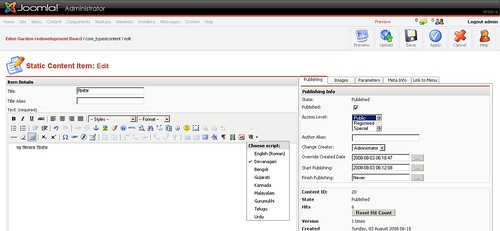
Once you are done, login to Joomla administrator panel and check tinyMCE, if you see a button on tinyMCE toolbar, Congratulations! you have finished the first step.