Tag: joomla

  • Media Manager Browse Button Disabled In Joomla

    Problem : No matter how many time you click on the media manager’s browse button nothing happens. It used to work few days back but not any more.

    It is as if the the media manager buttons has been disabled.
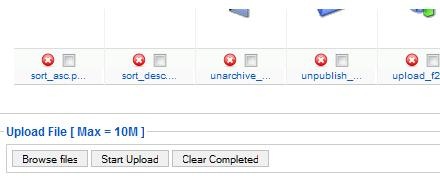
    media_manager_problem

    If you were facing these problems it is most probably due to the Flash uploader not working properly with Flash version installed on your system.

    Solution:

    The simplest solution to fix this issue is to go to,

    Global Configuration –> Systems –>Media settings.

    And select ‘No’ for ‘Enable Flash Uploader’ setting, and save the settings.

    mediamanager_config

    That’s it, this simple. Now go back to you media manager and upload files to your heart’s content.
  • my article on PuneTech

    I have written a simple introduction to Joomla for PuneTech, check out the article on PuneTech.

    And leave some comments their.

  • Joomla: Request To Response

    To do development work in any framework, it is a good idea to first study the request flow. This basically answers the question ‘what happens between request send to server and request received from the server?’.

    COPYRIGHT NOTICE

    I have made the Flow Diagram available here for public use and/or modifications, as long as you cite me as an author. Although I have decided to share this, it took awhile to create this version, so I would appreciate getting some credit for my work.

    Please refer to the Creative Commons Attribution-Noncommercial-share Alike license:

    http://creativecommons.org/licenses/by-nc-sa/3.0/us/

    You are free to share and make derivatives (i.e. corrections or updates), as long as you include a revision history, attribute the contributors as authors, you do not use it for commercial purposes, and you freely share the document.

    You can download the request to response flow diagram as [download#14#nohits] or as [download#15#nohits].

    Here is what happens in case of Joomla 1.5…

    (more…)

  • Enable Your Joomla To Write In Hindi, Marathi, Bengoli, Gujarati, Malyalam, Telugu and Punjabi

    UPDATE: This article is compatible only upto Joomla 1.5.12. I will make it compatible to latest version of Joomla as soon as i have time. Thank you.


    Recently I was required to give a presentation to an agricultural college, they wanted to create a website for their college in Marathi, which resulted in akIndicPlugin for tinyMCE as Joomla uses it as default editor.

    Here is how you can enable Joomla to write in Indian languages.

    Step 1:Install akIndicPlugin for tinyMCE

    Upload files to webserver,

    • Download the akIndicPlugin
    • Extract the archive using winzip etc. in a folder named akindicplugin
    • Now FTP the akindicplugin  folder and all files inside it, to “pluginseditorstinymcejscriptstiny_mceplugins” in case of Joomla 1.5.x or “mambotseditorstinymcejscriptstiny_mceplugins” in case of Joomla 1.0.x, using Filezilla.

    Modify the ‘tinymce.php‘ file

    • Open tinymce.php file in “editorstinymce” in  Notepad++ or your favorite editor.
    • In Joomla 1.0.x find $buttons2     = implode( ‘, ‘, $buttons2 ); or goto line number 250. In case of Joomla 1.5.x  find $buttons2[] = ‘forecolor’; or goto line number 190.
    • Add following lines at specified line numbers
    $plugins[]            = 'akindicplugin';
      $buttons3[]            = 'akindicplugin';
    • Save the file, and upload to webserver.

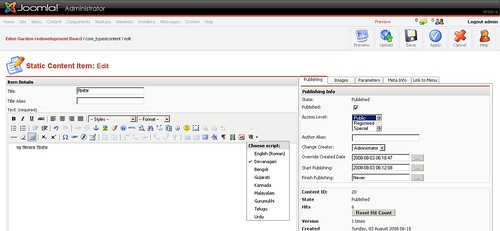
    Once you are done, login to Joomla administrator panel and check tinyMCE, if you see a button on tinyMCE toolbar, Congratulations! you have finished the first step.

    akIndicPlugin for tinyMCE in joomla

    (more…)

  • akJoomGallery : simple image gallery for Joomla

    Update: released the  version 1.1.0 with updated prettyPhoto and jQuery plugin. Download link below now links to updated version. If you need to download the old version from google code.

    Adding image galleries inside your Joomla! pages is now super simple with the “akJoomGallery” Plugin.

    You don’t need a specialist knowledge to use this mambot/plugin. akJoomGallery allows you to use images in your content item as image gallery. With it’s help you can convert any content item/page into a cool image gallery.

    The idea for this plugin came to my mind when we needed to show a quick image gallery to client, and we need something lightweight, with more control over how the image is shown in the gallery page itself. We could have used other big gallery components but I was not interested in something simple and quick. Check out the implementation of akJoomGallery.

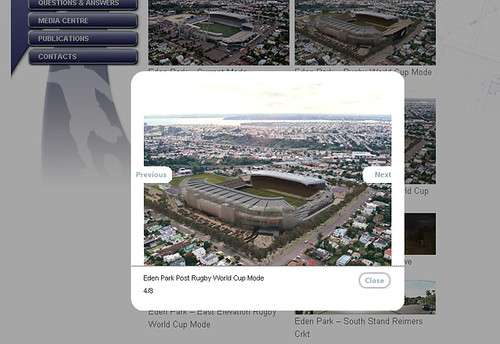
    akJoomGallery

    This plugin is best suited to those situations where someone want’s to add few thumbnails while writing the content, and would like to display the large size images when users clicks on them, without leaving the page.

    How To Install

    1. Just download the akJoomGallery plugin.
      1. [download#8#nohits]
      2. [download#9#nohits]
    2. In Administration panel of Joomla goto Installers ->Mambots(for Joomla 1.0.x) or to Extensions -> Install/Uninstall(for Joomla 1.5.x) .
    3. Upload this package file and Install.
    4. Now go to Mambots -> Site Mambots ->akJoomGallery or Extensions -> Plugin Manager->content – akJoomGallery and publish/enable the plugin based on the version you are using.

    akJoomGallery: Simple Image Gallery For Joomla

    Now, enjoy the simplest image gallery with lightbox effect.

    (more…)

  • Joomla 1.0.x : How it works

    I gave this presentation in skills camp pune last year. I am sharing the slides here, in hope some one still find it useful even though joomla 1.5 is released last month.

    In this presentation I talked about how Request flow in a joomla application. I also explained the entity relationship diagram (ERD) of joomla, that i created by reverse engineering the joomla database,  reading the code and off course searching the internet.

    The most difficult part to understand was user rights management part of the database. It is based on phpGACL library, reading their help files helped get clear idea about right management in joomla. Access Control chapter in joomla website also helped.


    and here is the recorded session of same.

    Joomla as a framework

    [utube]3k4ioE9QGG8[/utube]

    (more…)