Blog

  • Barcamp Pune 6

    The 6th Edition of Barcamp Pune is back in town on 14th November 2009 after almost an year.

    If you don’t know what is Barcamp check out the nice article by PuneTech and if you are students then why you should bunk the college to attend it.

    My first Barcamp was Barcamp Pune 3, which made me an speaker and also inspired me to organize biggest PHPCamp in India.

    krity-barcamp-logo-medium

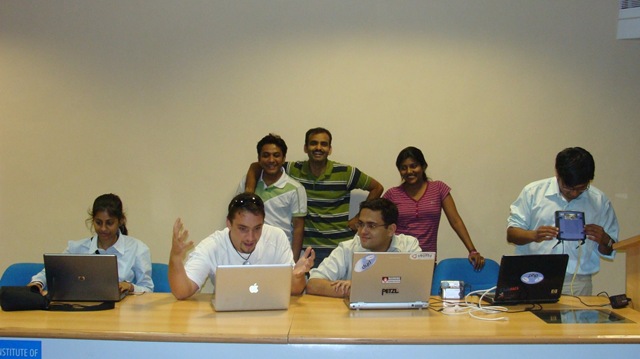
    If you want to know what happened in pervious editions of Barcamp then check out the pictures linked below( from my camera).

    1. Barcamp Pune 3
    2. Barcamp Pune 4
    3. Barcamp Pune 5

    Off course they are not all the pics, Google to see all the rest of them.

    I hope to see you all their.

  • Where is MySQL Gone Away?

    Last Sunday I got to work on a very interesting problem in WordPress which I initially thought could be solved in like 5 mins, but alas it took me almost 7 hours before I found and fixed the problem.

    Let me describe the problem, I was running a simple xml parsing script whose task was to parse the xml file and insert the content into WordPress database as a post, everything was working fine except the ‘INSERT’ statement was failing with out any errors. Basically everything would run but nothing would get inserted into database and no errors. We had used the ‘wp_insert_post’ function in  ‘post.php’ file to handle the insertion of post, which was returning ‘0’ instead.

    After lot’s of time spend checking and cross checking the sql statements for error and PHP code logic, i finally found the problem which was a small kinda cryptic error ‘MySQL server has gone away’ for every single query that was getting executed in the script.

    Well, a quick google search took me to MySQL manual page where it list bunch of possibilities on why the error might be coming.

    To me the most logical one were

      1. You tried to run a query after closing the connection to the server. This indicates a logic error in the application that should be corrected.
      2. A client application running on a different host does not have the necessary privileges to connect to the MySQL server from that host.
      3. You have encountered a timeout on the server side and the automatic reconnection in the client is disabled (the reconnect flag in the MYSQL structure is equal to 0).
      4. You can also get these errors if you send a query to the server that is incorrect or too large.
      5. You are using a Windows client and the server had dropped the connection (probably because wait_timeout expired) before the command was issued.

    I investigated each one but it turned out that because a query was taking a bit to long to execute MySQL closed the connection and refused all further request from the client.

    So you might be wondering what was the Solution to this problem.

    Well Rob of Rob’s notebook had the almost perfect solution for it. He created a replacement file for ‘wpdb.php’ which takes care of this problem, yeah it is temporary and you have to remember to replace this file every time you do an WordPress upgrade but it works.

    If you are facing this problem go download it and replace you ‘wpdb’ file and save yourself some time.

    Check out PHPCamp.net a article sharing website relevant to our own PHP community
  • Media Manager Browse Button Disabled In Joomla

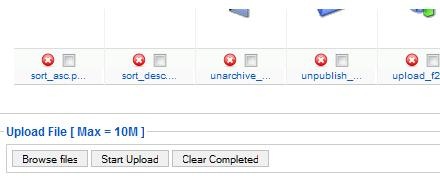
    Problem : No matter how many time you click on the media manager’s browse button nothing happens. It used to work few days back but not any more.

    It is as if the the media manager buttons has been disabled.

    media_manager_problem

    If you were facing these problems it is most probably due to the Flash uploader not working properly with Flash version installed on your system.

    Solution:

    The simplest solution to fix this issue is to go to,

    Global Configuration –> Systems –>Media settings.

    And select ‘No’ for ‘Enable Flash Uploader’ setting, and save the settings.

    mediamanager_config

    That’s it, this simple. Now go back to you media manager and upload files to your heart’s content.

  • How to use SVN and Git together to get the best of both worlds in Windows

    I have been using SVN to manage my source code for last three years, I can say I am quite happy with it, except for one problem, it was not possible to commit the code unless I was directly connected to my office network.

    Then I heard about DVCS and Git. I found solution to one of my big problem, ability to commit code while I am not connected to office network, and share code with my teammates.

    Their was only one small problem we didn’t wanted to loose the benefits of centralized repository, and we use Windows  OS( let’s not get into windows vs linux, i will win). So last 3-4 months I was looking for different DVCS systems with better windows support and i experimented with Mercurial (TrototoiseHg is good), but i think Git wins the race of DVCS hands down, and with popularity of GitHub I don’t see much choice here.

    And finally I found about git-svn, and I was on my way.

    Here are the commands and steps that you can use to manage Git and SVN together.

    1. Create a working copy(or actually a git repository ) using
      git svn clone –s <path to ur svn rep, eg https://akjoomgallery.googlecode.com/svn/trunk/>
    2. Get the source from svn repository to your git repository using
      git svn fetch

      (only needs to be done first time, it is slow and time consuming process)

    3. When you need to update your working copy  you use
      git svn rebase
    4. When you need to commit back to svn repository just use
      git svn dcommit

    I used above commands in Git bash shell that comes with Git.

    Also note their would be time when we have some changes in the Git repository that is not yet ready for commit, but we need to update our repository and Git won’t let you do that, without committing them (rebase will always give error) in such situation you use following set of commands

    git stash
    
    git svn rebase
    
    git stash apply
    
    git stash clear

    Update:

    And if you don’t want to these things manually here is my favourite tool that does that using nice GUI and perfect windows integration TortoiseGit

    I have written this a month back before I found TortoiseGit, so this is now just for reference, and to get me back to my blogging.

    Have fun.

  • Joomla Day Pune(India)

    On 25th April 2009 we hosted first ever Joomla Day in India. This was made possible by support of Parth and Ashwin who forced me to also think about Joomla Day in last years PHPCamp, where we were planning for Drupal camp.

    They were later joined by Shardul, who was already pushing for Joomla day in India at events forum in joomla.org. He was the person who was on our first coffee meet to discuss how to get going so that we get official approval from OSM. He also pushed me to create and register Joomla User Group Pune, for the event.

    We met multiple times to talk and plan how things should happen.Volunteers Team on 24th evening for Joomla day

    In middle of all this, out of nowhere, Mangesh joined us. He was instrumental in actually making joomladay.co.in website usable, as Ashwin and Parth could not give the time and attention to it. He also ended up hosting the website on his server, when we started having trouble with dream host.

    With organizers team ready, we needed few volunteers,  this is where Tara came into picture, he helped us with venue and insisted that we give I2IT a try. Krity worked on the content of the website and faq’s. Kinjal helped us with photographs, Rucha and Shruti helped us managing the registrations on the day of event.

    Finally I want to thank Toby Patterson for coming all the way from Thailand to help us with Joomla Day.

    Guys to stay updated about Joomla User Group Pune activity follow us on Twitter or Subscribe to our google group mailing list as Joomla Day is just an start.

  • Simple JavaScript ‘Frame Busting’ Code

    Here is a quick JavaScript  code that you can use if you want to make sure that no one should be able to show your website in an IFrame.

    <script type="text/javascript">
    if (top !=self) {
       top.location=self.location;
    }
    </script>

    Just put this code in head section of your html page, and it will ensure that your page always get’s displayed outside the frames.

  • One Year Of Writing

    On 25th February this blog turned 1 year old.

    I am happy to say that in my 3rd attempt to be a blogger I have finally succeded.

    Thank you every one for commenting and reading which kept my interest alive.

  • How do I find out more about the startup ecosystem in Pune?

    Their was a very good discussion that happened at Pune  startups mailing list.  Topic of discussion was how do students find a way to get inside startup fraternity. Result of that discussion is that, we now have POCC-students group and mailing list created to help fill the gap.

    What is the most interesting is,  we were discussing how to get students invlove in open source, while techstart.in group was formed to give students mentoring.

    Anyways,  I thought I will just put action points from that mailing list as a blog post so that few more people could find it.

    Here is what Navin and other’s believe should be done by students to connect with  Pune startup faternity.

    To stay plugged in to the Pune startup ecosystem, I suggest the following:

    1. Subscribe to the PuneStartups (POCC) mailing list:
    http://groups.google.com/group/punestartups
    2. If you are a student, or interested in students, subscribe to the
    POCC mailing list: http://groups.google.com/group/pocc-students
    3. Stay in touch with Pune tech community events and other information
    via PuneTech: http://punetech.com/subscribe
    4. Join twitter. I’ve found that twitter is a great place to get
    information about Pune Startups. On twitter follow @punetech

    As startups always look for passion and skill in people they hire, so being active on one of the forums mentioned below can increase you chance of getting hired and also to interact and find mentors in local community.

    Please choose according to your interest

    1. Join PHPCamp mailing list http://groups.google.com/group/phpcamp
    2. Join Drupal India Community mailing list at http://groups.drupal.org/india
    3. Join Joomla User Group Pune mailing list at http://groups.google.com/group/jugpune
    4. Join Barcamp pune mailing list at http://tech.groups.yahoo.com/group/barcamp-pune
    5. If mailing list is to much for you, then follow some of the most active pune techies and tech events on twitter.

    Again, I am biased towards PHP and PHP Community, so I have very limited knowledge of other tech events and their mailing list, So if any one of you are active on any other mailing list that is useful for students than please leave a comment I will update the post.

    Are you satisfied with your knowledge? No, then spent 15 minutes every day on PHPCamp.net a knowledge sharing website for our own PHP community

    Update

    Here are few more groups for you

    1. Join Null group at http://null.co.in/, they talk only about cyber security and hacking.
    2. Join Flex users mailing list at  http://groups.google.co.in/group/pune-flex-users
    3. Join Pune Linux User group at http://www.plug.org.in/mailman/listinfo/plug-mail
    4. For Techie Girls out their, Join LinuxChix  http://mailman.linuxchix.org/mailman/listinfo/indichix
    5. Join Ruby users mailing list at http://tech.groups.yahoo.com/group/puneruby/
    6. Join Pune Java User Group http://groups.google.com/group/Pune-Java

    So many options, and still students ask where to look?

  • Debugging PHP using Xdebug and Notepad++ : Part 2

    In my previous post, I have shown how to configure Xdebug and Notepad++ for debugging.

    In this final part, I will take some example to demonstrate and show how to use the setup to make  debugging an PHP script easier and actually fun.

    Initially I thought that I will write an article, but then I thought it is better if I do a screencast. This is my first(well it is second but that was without voice long time back) and voice of the screencast is not so good, you will need a headphone to get the voice clearly.

    I have shown the debugging using a Joomla content component.

    (more…)

  • Integrating With Twitter API In CodeIgniter

    I needed to integrate Twitter API in one  of my web applications which uses CodeIgniter framework.


    As their is no direct library available in CI for twitter integration, at first go this might look very difficult, but it is really simple.


    Here is how you can do it..

    1. First download the  Twitter class for PHP.
    2. Put the class.twitter.php file in application/libraries folder.
    3. Rename class.twitter.php to twitter.php ( to make it compatible with CI naming conventions).
    4. Open twitter.php file and set following variables
    var $username=’'; //twitter username
    var $password=''; // twitter password
    var $user_agent=''; //an identifier for twitter preferably email address
    Are you satisfied with your knowledge? No, then spent 15 minutes every day on PHPCamp.net a knowledge sharing website for our own PHP community

    If you have followed these steps your integration is almost complete, now all you need to do is use the twitter library, here is an example to get you started 🙂

     $this->load->library('Twitter');
     $msg=’Just Integrated Twitter with CodeIgniter ’;
     $this->twitter->update($msg);

    By the way you can follow me on twitter @thecancerus.