Abhishek has written, how you can integrate my akIndicPlugin for TinyMCE to Drupal. I have already written how you can integrate this to Joomla.
Blog
-
I Am Good But….
You must have heard this phrase form your friends, colleagues or candidates, while explaining the reasons of why they have don’t have success.
I am for sure used these excuses during early days of my career, before I realized my mistake.
So what are the excuses I am talking about?
Well, here they are
- My company is not good. yeah sure, is my response to this. I really don’t understand this excuse, after all how a company is related to the program I write.
- My project is not good. This basically means that what I am doing, is not what I want to do. Sometimes in professional life it is possible to get stuck in projects that we don’t like, but I have always believed that even a boring project can be made challenging and all exciting by simply setting some higher standards for yourself in the project.
- My clients are not good. This one I understand and relate to, but looking back I can say, I have learned maximum while I was working with these not so good clients. Their near impossible demands(at that time) helped me stretch my ability, which might not been possible with if I had only worked for good clients.
- My Seniors are not good. When someone say this to me, I always ask them why should they. After all sooner or later you will be competing for their positions.
- My Team mates are not good. They never are, accept this fact and consider your self very lucky if you get good team mates. Again the reason is quite simple, only one among your team can become next team leader. I am sure you want to be that person, but so does other members of your team. Now you tell me, will you help your team mate in his quest to become next team leader? understand what I am trying to say.
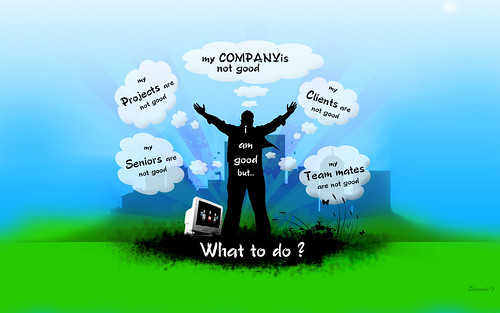
Now to answer the inevitable question that these people ask after giving these excuses
-
akTweeter Simplest Way To Show Tweets
For those in hurry download
[download#16#nohits]now.It is a simple Joomla 1.5 module to display Tweets on a topic or event.
What it does?
akTweeter uses Twitter search to show latest 5 tweets, on any topic that you want to show tweets about.
 It is useful if you want to display tweets on some event or your product.
Requirements
This module is compatible with Joomla 1.5 only and released under GPLv2 License agreement.
Are you satisfied with your knowledge? No, then spent 15 minutes every day on PHPCamp.net a knowledge sharing website for our own PHP communityHow to use it?
- First of all download
[download#16#nohits]module and install it. - Go to module manager and activate the akTweeter Module.
- Finally, edit the module and set the keyword you want to monitor.

That’s it, you are done.
If you liked it, hated it or have any suggestions just leave a comment below.
- First of all download
-
Opensocial Developer Garage
During PHPCamp Pune 08 we saw lots of interest in Opensocial, so some campers decided to give Opensocial it’s due.

We are now organizing first edition of Opensocial Developer Garage in Pune on 20th December 2008. So get over to http://developergarage.in and register yourself as soon as possible, as this is invite only event and only 200 people will be invited.
If you want to speak, then please fill speakers registration form. This time we will choose the speakers in advance and will let everyone know who is speaking and when.
While we are still looking for venue (as usual), you may want to spread the word to you friends.
PS: we are also looking for sponsors, to make this event a free affair for participants. check out our budget needs and if you are interested send an email to developergarage@gmail.com
-
Joomla: Request To Response
To do development work in any framework, it is a good idea to first study the request flow. This basically answers the question ‘what happens between request send to server and request received from the server?’.
COPYRIGHT NOTICE
I have made the Flow Diagram available here for public use and/or modifications, as long as you cite me as an author. Although I have decided to share this, it took awhile to create this version, so I would appreciate getting some credit for my work.
Please refer to the Creative Commons Attribution-Noncommercial-share Alike license:
http://creativecommons.org/licenses/by-nc-sa/3.0/us/
You are free to share and make derivatives (i.e. corrections or updates), as long as you include a revision history, attribute the contributors as authors, you do not use it for commercial purposes, and you freely share the document.
You can download the request to response flow diagram as
[download#14#nohits]or as[download#15#nohits].Here is what happens in case of Joomla 1.5…
-
Parsing RSS Feeds Inside Your Joomla Modules or Components
In Joomla 1.0.x it was a bit difficult to parse a RSS feed file inside you component. If you wanted to do that you need to include either SimplePie or some other RSS parsing library inside your component.
This is not the difficult part, difficult part was that, it might conflict with some other component or module that might also be using the same library.
In Joomla 1.5 you don’t have to worry about this issue any more. It now includes SimplePie library in the framework itself.
To use the library that comes with Joomla all you need to do is
jimport('simplepie.simplepie');this will include the SimplePie library in you component or module.
Afterwards you can just create a SimplePie object start and using all the functions. In case you don’t know, here is how you can do that
$feed=new SimplePie();
Neat and simple isn’t it?
PS based on this information I have created a simple module to display new 20 tweets for a particular event, which I will be sharing in next few days.
-
10 Things I Gained At PHPCamp
When I returned home after PHPCamp, my younger sister asked me what was my benefit in organizing the event when I did not gave any talks.
I thought that their would be others who would like to know about this, so here are 10 things I gained at PHPCamp without giving any talks.
1. Do Something.
It reinforced my belief that if you need something and it is not available, then go ahead and create it. Don’t wait for someone else to do it, changes happens when you do something about it. When I was thinking about an un-conference dedicated to PHP, I didn’t know what to do about it. When I talked with few people they sounded interested in the idea, but not willing to do anything about it. Once I created PHPCamp website and announced about the event, everything fall in place, And not only that it become the biggest un-conference in India with more then 700 campers participating out of 1212 registrations.
2. Meet people, I knew online
When I started PHPCamp’s Google group many people pitched in to talk about different aspect’s of organizing the camp. At PHPCamp I met them for first time. Some of them are Dipen, Rohan, Jignesh, Nishit, Shantanu oak, Sandeep, Ashwin and Bipin.
3. Photo in Pune Mirror
I had never thought I will get in news papers, but thanks to PHPCamp I got pictured in Pune Mirror and guys this is not the best part. ‘PHP’ got mentioned in a Indian News Paper without job ad, that is the best part. Before this, I had never seen PHP being mentioned in a daily newspaper.
-
PHPCamp: India’s Biggest Unconference
I have just returned after un-organizing India’s biggest un-conference. 1212 people registered before we closed the registrations yesterday at 7.30pm.
Today despite heavy rains, 700+ people from Mumbai, Ahmadnagar, Nasik, Pune and Bangalore turned up.
I would like to take this opportunity to thank Symbiosis(SICSR) students and Pune IT Labs Volunteers who did all the hard work to make a dream come to a reality. Special thanks goes to Tarun and Rohit for giving PHPCamp an explosive start.
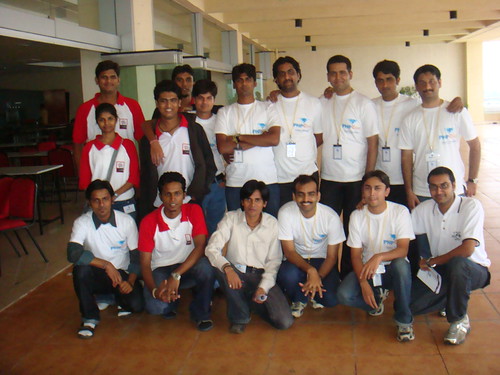

Checkout More Photos at Flickr Group.Thank you everyone for making PHPCamp India’s Biggest Unconference.
Note: Their is more on my blog then just PHPCamp, spend some time to check them and if like my articles, then please subscribe to my RSS Feed
-
PHPCamp in Pune Mirror
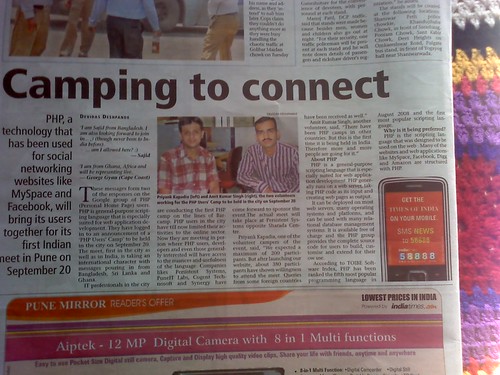
News about PHP and PHPCamp was published in today’s Pune Mirror.
Their is just one mistake though, MySpace[:( ] is not in PHP. It’s my mistake, I conveyed the wrong information while disscussing[i still can’t figure out from where ‘myspace is in php’ came to my mind] with reporter, stupid me 🙁 .
I regret not saying Yahoo Answers or Wikipedia as an example instead of MySpace.
-
Easy File Uploading Solution For PHP
Uploading files/images is a task that is required in almost all web applications.
While uploading file is a very simple task, still lot of beginners in PHP get stuck in this step. So in this post I decided to share the functions I learned while I was a beginner, and I still continue to use them because of it’s simplicity and usefulness.
For all my file uploading needs I use the class.upload.php written by Colin Verot. Ok, I know all about PHP functions like move_uploaded_file() and is_uploaded_file(), still I prefer to use class.upload.php file because, this file provides me with good set of image manipulation functions along with a neat way to know when a file has been uploaded.
So, let’s get started on, how to easily upload a file in PHP.
First, let’s create a simple HTML form for uploading files.
 <form action="file-upload.php" method="post" enctype="multipart/form-data">

  Upload file: <input type="file" name="fileupload">

                  <input type="submit" value="save">

 </form>
It is important to note that the form’s enctype is multipart/form-data. This a place where novice developers make lot’s of mistake, they will forget to add enctype attribute to form and them spends hours thinking why they are not able to upload files or images.
Now, that we have a form to upload files, let’s see how we can handle file uploads on server.
I am going to cover four scenario’s here.

