UPDATE: This article is compatible only upto Joomla 1.5.12. I will make it compatible to latest version of Joomla as soon as i have time. Thank you.
Recently I was required to give a presentation to an agricultural college, they wanted to create a website for their college in Marathi, which resulted in akIndicPlugin for tinyMCE as Joomla uses it as default editor.
Here is how you can enable Joomla to write in Indian languages.
Step 1:Install akIndicPlugin for tinyMCE
Upload files to webserver,
- Download the akIndicPlugin
- Extract the archive using winzip etc. in a folder named akindicplugin
- Now FTP the akindicplugin folder and all files inside it, to “pluginseditorstinymcejscriptstiny_mceplugins” in case of Joomla 1.5.x or “mambotseditorstinymcejscriptstiny_mceplugins” in case of Joomla 1.0.x, using Filezilla.
Modify the ‘tinymce.php‘ file
- Open tinymce.php file in “editorstinymce” in Notepad++ or your favorite editor.
- In Joomla 1.0.x find $buttons2 = implode( ‘, ‘, $buttons2 ); or goto line number 250. In case of Joomla 1.5.x find $buttons2[] = ‘forecolor’; or goto line number 190.
- Add following lines at specified line numbers
$plugins[]            = 'akindicplugin';
  $buttons3[]            = 'akindicplugin';
- Save the file, and upload to webserver.
Once you are done, login to Joomla administrator panel and check tinyMCE, if you see a button on tinyMCE toolbar, Congratulations! you have finished the first step.
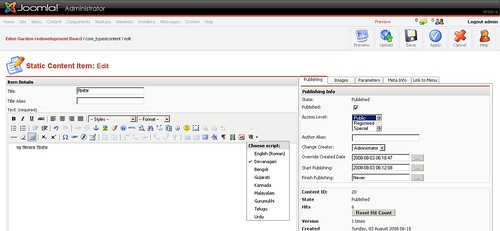
Step 2: Make Joomla To Display Indian language
This is very easy, just make sure your template has charset set to UTF8 and you are done.
Wondering how you can check that, simple just do a view source of your web page and check for following line
<meta http-equiv="Content-Type" content="text/html; charset=UTF-8" />
is their in the page.
If it is missing, in that case simply add above line to “index.php” file in your Joomla template in frontend as well as administrator template.
Now to complete the whole process, just create a new language file in your language and you are done.
Comments
75 responses to “Enable Your Joomla To Write In Hindi, Marathi, Bengoli, Gujarati, Malyalam, Telugu and Punjabi”
thank you sir for your step by step guidance..
it is really very easy to understand and do…
it worked out in first shot.
thank you..
Hello,
Thank you for creating such a useful program and step by step instructins. I have managed to install it and button shows on toolbar and i can select different languages and write in punjabi but once i save the document all punjabi characters turn into question marks. Can you help please.
Look forward to your reply.
Thank you
Ravinder
@ravindra you have to change database collation of content table in utf-8, also the page’s content type should be utf-8
Dear Sir,
Thank you for reply but how do i do this
(“ravindra you have to change database collation of content table in utf-8, also the page’s content type should be utf-8”)
I dont know much about databases and websites sir.
Thanks
Ravinder
When we save the matter all change into ??????? like that. you can see in drishtipat.com
please help in this matter. how to solve this problem and also tel me how to write title in hindi.
thanking you
Amresh Kumar
Hi Amit,
First of all Congrats for launch of phpCamp.net . I am having one question regarding the Hindi plugin for Joomla.
As you plugin is working for content of the site. But I need the Site contents like menu and other ini variables in hindi to start the work.
Like USERNAME, PASSWORD and other words on the site.
Is there any place from where I can get these translation to begin my work.
Thanks in Advance.
Have a Great Day.
mayank checkout http://www.indicjoomla.org/ or joomla froum http://forum.joomla.org/viewforum.php?f=162
Thanks Amit for the links.
Enable Your Joomla To Write In Hindi, Marathi, Bengoli, Gujarati, Malyalam, Telugu and Punjabi . the follwing steps make the editor working fine in mozilla firefox but not at all in IE 6 or above . IN IE7 the editor is showing the akindicplugin button but on typing the keyboard english letters are being shown . do i need to install fonts for thats in the machine ?? or there are some other process ??? please help
@diptimoy i have checked this steps in IE7 and Firefox and they work for me.. something else might be wrong on your end. IE6 is not supported.
Thank you for creating such a useful program and step by step instructions. I have installed it and button can be seen on toolbar and I can write in Hindi as well but after I reopen the same article, I find all hindi font converted into question marks. I have checked the unicode utf-8 and also enabled my mozilla 3.0.6 for Hindi viewing but still I do not get it.
Would you be able to help?
-Hariprakash
@Hariprakash download the hindi font and u ur problem get solved
Thanks for your response Diptimoy,
I have installed Joomla for website development and installed akIndicPlugin to type/see content in HIndi. Now, when I am saving the hindi content, it gets converted in ‘?????’. My problem is even if I install hindi fonts and might be, I can see hindi font but how will others see content who does not know about installing hindi font, like, how come I can see hindi font in drishtipat.com. I can see hindi font on drishtupat.com so i am asuming that either hindi fonts are available in my laptop or I am missing something and not able to see hindi font using akIndicPlugin.
change database collation of content table in utf-8, i think you are not storing the data properly
@amit kumar singh . i am just a begineer in JOOmla . I am a developer . can you please help me the way to follow and which books to follow. i am reading the online documentation http://docs.joomla.org/ but unable to assemble them properly . can you please provide me a solution to this . I will be grateful to you
@diptimoy We are doing Pre Joomla! Day meets in Pune on 28th Feb and 28th March, try to come on one of those meets, more details at http://joomladay.co.in
Thanks Amit for help,
Its working now.. I had few emails with Amit and got to the root cause and its resolved. I am writing below steps if anyone else also have similar problem.
1. The problem: I installed Joomla for website development and installed akIndicPlugin to type/see content in Hindi. Although Hindi characters were appearing while typing but was getting converted to ‘????’ after saving.
2. Root cause: The data was not getting stored properly in the content tables in database at the time of save.
3. Steps to resolve:
a. Access database collation using using phpMyAdmin
b. Select ‘Character Sets and Collations’
c. Select ‘Databses’
d. Click on your database where all the website information is getting stored
e. Under ‘Structure’ tab, ‘jos_content’ table will appear. Open the table by clicking on button ‘structure’.
f. Change all parameters to utf8_general_ci. All these collations were earlier had latin1_swedish_ci.
Hope, above steps will help.
– Hariprakash
Hi,
Thanx for helping out with Indic language.
I am using Joomla 1.5 and followed your instructions [uploaded the .zip to said folder in C-Panel, extracted the files to akIndicFolder, edited tinyMCE.php file]. However I am not able to see the button in the editor in ‘Add Article’ Section.
Can you tell me where to insert the “$plugins[] = ‘akindicplugin’; $buttons3[] = ‘akindicplugin’;” lines? I mean before/after what lines of code?
@ganesh,
In Joomla 1.0.x find $buttons2 = implode( ‘, ‘, $buttons2 ); or goto line number 250.
In case of Joomla 1.5.x find $buttons2[] = ‘forecolor’; or goto line number 190.
mera problem hai ki main hindi patrika ka prakashan karta hun . compose pagemaker or coraldraw men karta hun. web site par us samachaar ko kaise uplosd karun. font krutidev ya walkman chanaykya prayog karta hun. please help me soon.
@amit kumar singh . hi great news about joomla day .please try to arrange one in kolkata also
thanks a lot for this lovely plugin and installation guide.
looking forward for much more pulgins and modules from you sir.
thank you
adarsh
Modify the ‘tinymce.php‘ file
* Open tinymce.php file in “editorstinymce” in Notepad++ or your favorite editor.
* In Joomla 1.0.x find $buttons2 = implode( ‘, ‘, $buttons2 ); or goto line number 250. In case of Joomla 1.5.x find $buttons2[] = ‘forecolor’; or goto line number 190.
* Add following lines at specified line numbers
$plugins[] = ‘akindicplugin’;
$buttons3[] = ‘akindicplugin’;
NOTE: Do I insert this code after the line which says $buttons2 = implode(…. or before it in Joomla 1.0.x
NOTE: Do I insert this code after the line $buttons2[] = ‘forecolor’; or before it in Joomla 1.5.x
If you want I can send you both the tinymce.php files found in joomla 1.0 and joomla 1.5
thanks in advance
It’s not working for me.
I am getting blank screen.
I am using joomla 1.5.10
Here is the code I inserted after extracting akIndic plugin to pluginseditorstinymcejscriptstiny_mceplugins.
// text color
$buttons2[] = ‘forecolor’;
$plugins[] = ‘indiaplugin’;
$buttons3[] = ‘indiaplugin;
if ($language->isRTL()) {
$text_direction = ‘rtl’;
} else {
$text_direction = ‘ltr’;
}
….. and so on.
When I go to “add article”, I get blank screen.
It works with only tinymce 2.x
First replace /plugins / editors /tinymce with version 2.1.3 You can download it from here.
http://nchc.dl.sourceforge.net/sourceforge/tinymce/tinymce_2_1_3_dev.tgz
Then the above documentation will work fine.
look forward for updated plugin with more features and more userfriendly.
Hi Amit,
Thanks for the akIndicPlugin. It is working perfecting fine for me. Currently, I am using Joomla 1.5.
I have one question for you that
1. Using akIndicPlugin, we can type/insert Indian language text through Joomla. But I wanted to get Feedback from the User in Marathi. And for that I wanted to provide Indian language typing functionality on Site for the user.
How do I solve this issues using Joomla?
Thanks,
Shree
Hi,
Thanks for your efforts. I tried your steps above and it works ! though I am new to Joomla. This is really exciting. I have a few followup questions tough. I see the ‘Sa’ button in the TinyMCE and am able to type in Hindi, and Punjabi, but Malayam and Kannada do not enter. Am I missing the language file ? I did not enter anything for Hindi or Punjabi either.
Also, I do not see Tamil and other major Indian languages. How can I include Tamil and other languages. Please let me know. Much appreciated and look forward to hear from you.
Hello guys,
i am using latest joomla 1.5.12
i am trying to do but not working
even i am not getting
“$buttons2[] = ‘forecolor’;” on line number 190 on tinymce.php
at line number 190, i am getting only “array_push($buttons2_add,’|’);”
but getting partially smiler thing on line no. 232
“$buttons2_add[]= ‘forecolor,backcolor’;”
i also try to put the code under this but it didnt work.
Do you have a plugin and instructions to use the JCE HTML editor. I was able to use this sucessfully in the TinyMCE editor.
Thanks,
Akshar
I am not able to fulfill the steps because am not getting the above described things. I found my TinyMCE version is different as Praphakar says
it is Version: 3.2.4.1 (2009-05-25).
So can you guy plz overview this and give any idea/suggestion?
Hi guys,
Same problem with me, i am also using latest joomla 1.5.12, and not able to do as desribed above. Please help if someone get the resolution.
Thanks,
Sandeep
im using JOOMLA 1.5 its not working my side need some help
Hey Amit,
188> //Initial values for buttons
189> array_push($buttons2_add_before,’cut’,’copy’,’paste’);
190> array_push($buttons2_add,’|’);
191>
192> // Plugins
193>
194> // fonts
195> $fonts = $this->params->def( ‘fonts’, 1 );
196> if ( $fonts ) {
197> $buttons1_add[] = ‘fontselect,fontsizeselect’;
198> }
I am not able to see the line what you have asked to find on the file tinyMCE.php
i have written the code snip. from the file.
I am using Joomla 1.5.14
If you have an option for JCE (plugin version 154, component version 157)
Please help me out…
Thank you Sir.
i am not find the this code
$buttons2[] = ‘forecolor’;
in my joomla tiny editor in line no 190.
instead of this i found the code like
188> //Initial values for buttons
189> array_push($buttons2_add_before,’cut’,’copy’,’paste’);
190> array_push($buttons2_add,’|’);
191>
192> // Plugins
193>
194> // fonts
.
plz help me to solve the problem
Is it possible to use Google transliteration in TinyMCE or JCE editor?
=Pankaj
Dear All, in new version of Joomla 1.5.9, tinyMCE is also update (version tinymce.php 12546 2009-07-23) and I acnnot find $buttons2[] = ‘forecolor’;
in my joomla tiny editor in line no 190.
In old tinyMCE (version tinymce.php 10709 2008-08-21), it was there. Can anyone help to change the new TinyMCe.php so akIndicPlugin works.
i am not find the this code
$buttons2[] = ‘forecolor’;
in my joomla tiny editor in line no 190.
instead of this i found the code like
188> //Initial values for buttons
189> array_push($buttons2_add_before,’cut’,’copy’,’paste’);
190> array_push($buttons2_add,’|’);
191>
192> // Plugins
193>
194> // fonts
.
plz help me where i write this code….
I using joomla1.5 to develop a new look. I need your help in gujrati language. How can possible gujrati language in joomla template. Please give me early.
Thanking you,
Amit Chauhan
IT OFFICER
CERC
9428421665
Dear Amit,
i am unable to find the code
$buttons2[] = ‘forecolor’;
in my joomla tiny editor in line no 190.
instead of this i found the code like
188> //Initial values for buttons
189> array_push($buttons2_add_before,’cut’,’copy’,’paste’);
190> array_push($buttons2_add,’|’);
191>
192> // Plugins
193>
194> // fonts
.
plz help me where i have to write this code….
First of all I must thank you for akindicplugin – it worked great for me on joomla- tinymce. I am also looking for somthing similar for blog commenting software too. Any idea if anything is available for any of the joomla1.5 commenting software?
Many Thanks for this plugin.
It works great, just what I’ve been looking for. Installed and live in minute!
Great work.
All the best
hi dear… i have created a website on my town… it needs to integrate indic.. but i failed to do so.. coz of template…
I couldn’t find the like number or code you specified in my template..
Please let me know the solutions..
Thanks in advance…
-Suren
it is really very use full
thanks
please tel me how to crate language file
Hi it is working fine. But all titles are in English only. How to change titles to Indian languages
Dear Sir,
Thank You soo much for your good work. Its working soo great. Installation also very easy.
Thank You
Venu..
i see the all optional but i m not able to uderstand where copy the scrip in tinymce.php
any one send me edited tinymce.php and that plugin folder on my mail id
akindicplugin.zip and modify tinymce.php file
shrikant1983@hotmail.com
thanks in advance
I am able to type in hindi language in editor. it’s working. but my problem is when i’m embedding and html page which have some paragraph written in hindi it’s not showing it properly. what to do? pls help.
thanks in advance
I have done all the steps of uploading the hindi font in joomla website. Bt its nt get installed. I have upload the akinidicplugin folder & modified the tinymce.php file and then again,I have uploaded it in the server. Can you suggest me that on which I m lacking to install tinyMCE toolbar in my joomla webseite.
I have done all the steps of uploading the hindi font in joomla website. Bt its nt get installed. I have upload the akinidicplugin folder & modified the tinymce.php file and then again,I have uploaded it in the server. Can you suggest me that on which I m lacking to install tinyMCE toolbar in my joomla website. Please suggest me under which folder,do i need to save tinymce.php file in server so that it works. Please help.
I am using joomla1.5. How can I include Tamil language in joomla1.5. please help me.
[…] can find instructions on how to install and make it work here http://zero.thecancerus.com/akindicplugin-for-tinymce-and-joomla. With the help of information found here you could even extend it to make your menus and site text […]
I have done the step1 with my joomla site 1.5.7 all has done successful but nothing is appear for text language editing. Please help
why there is no updates since long time ????
Ok.. I see many comments asking for help on installing this plugin on some of the Joomla versions. No one replied but some replied saying that they are able to make it working. The question is why can’t they say, how it was done and help others to achieve the same. Do you want to know whether you are successful or not. Of course, yes, but we also want to know how you did it, so that it is useful for others.
everything done, but now i am unable to save the article, save & apply gets disabled. please help
please help, i have completed all the steps, i am able to write in hindi now. but my apply and save buttons get disabled with this plugin installed. plz help
I’m having difficulties installing TinyMce on Joomla, I try to install it it via folder and ftp with no success.
When I try to install it via Joomla I got this error “xml file not found”
can anyone help
Thanks
Respect sir,
Your command is not working in joomla 1.0.8 version can you help me to create a tinymec from my website please help me. I shall be grate thankful to you.
Ram Gupta 19 July at 12:28
http://www.indianewsnviews.com/ for this site want convert my editor in hindi or roman hindi option but i have install the akindicplugin to follow same process which has been sdescribe at ur website http://zero.thecancerus.com/akindicplugin-for-tinymce-and-joomla/ …….but i do not get this word
Now to complete the whole process, just create a new language file in your language and you are done.
pls give me a valuable solution for that because i have get trouble in that
dear sir,
i found this line on line 190 & am using Joomla 1.5.17. please guide.
if ($this->params->get(‘element_path’, 1)) {
when i am copying from elsewhere and pasting, then site is working in telugu. but when i try to type in browser, i am unable to type. please guide me.
dear sir, Thank u very much for offering such a knowledge to the society. for me every thing worked. but when i am typing telugu Rama, as a result i am getting the following.
ీోసో i am supposed to get రామ (this i typed in google translater and pasted).
Train me.
Reply awaited.
how can i make joomla to write the article name in punjabi or hindi
Is this plugin work for Joomla 1.5.20? I have tried all the instructions but it does not show on Tinymce editor. Please help.
i see the all optional but i m not able to uderstand where copy the scrip in tinymce.php
any one send me edited tinymce.php and that plugin folder on my mail id
akindicplugin.zip and modify tinymce.php file
please send me formated tinymce.php
thanks sir
satya
hi guys,, this pllugin is really very great..this is really great..
plesae follow this lines
// template
$template = $this->params->def( ‘template’, 0 );
if ( $template ) {
$plugins[] = ‘template’;
$buttons3[] = ‘template’;
}
// text color
$plugins[] = ‘akindicplugin’;
$buttons3[] = ‘akindicplugin’;
from http://www.vdeserve.com
sagar
hi,
i install above folder in my cpanel.i also change in tinymce.php file but cant work it. also data base is utf-8 …
my tinymce code
// table
$table = $this->params->def(‘table’, 1);
if ($table) {
$plugins[] = ‘table’;
$buttons3_add_before[] = ‘tablecontrols’;
}
$plugins[] = ‘akindicplugin’;
$buttons3[] = ‘akindicplugin’;
plz help me.my joomla version is 1.5.22 plz send tinymce file
my joomla version in 1.5.22 so plz send tinymce.php file via email
thnaks
Thank you for this useful article.
Are there any ready plugins for this?
please send me a email..
so that i will send you a file..
send whenevver you want i will give it quickly..
Dont worry
http://www.vdeserve.com
please send me a email..
so that i will send you a file..
send whenevver you want i will give it quickly..
Dont worry