Category: php

  • PHP5 patch for FunctionList plugin of Notepad + +

    As you may know Notepad++ is my preferred development tool for PHP, and two months back I found FunctionList plugin that shows list of function in a opened PHP file, and it increased my productivity almost immediately.

    Only drawback was that it showed just function list and not variables.

    And today I found this neat patch of this plugin by Geoffray Warnants which now makes it even better with icons and also showing variable.

    This is how it looked before

    functionlist-default

    This is how it looks after the patch

    functionlist-php-patched

    Download the patch here (post is in French, scroll down to download the patch)

  • Installing PEAR and PHPUnit on WAMP and Windows 7

    In the project that i am currently working on, we decided to use PHPUnit for doing our unit testing, and i found that it was not a straight forward thing to install that I had thought it would be. I had to start by installing Pear, and as soon as i type ‘go-pear’ in command prompt and pressed enter key I got my first error.

    So here are the steps needed to install PEAR and PHPUnit error free on WAMP.

    So let’s start with PEAR, please note my Wampserver is installed on drive ‘H’,  substitute it with your own. Also when this tutorial was written, php was in php5.3.0 folder, please use the path as per your current setup.

    (more…)

  • Simple Way To Add Global Exception Handling In CodeIgniter

    I am working on a project where we needed to capture exceptions at a global level instead of doing it at every step as they were not critical, but important for us to know.

    The idea was that whenever such an exception occur on production we should send an email to developers mailing list so that someone can investigate it.

    As usual I did a quick google search and i found two forum posts in CodeIgniter and one on stackoverflow, but they all fall short as CodeIgniter does not set’s any default exception handlers they way it sets the native error handler.

    So here is a quick tutorial on how you can do that.
    (more…)

  • CodeIgniter 2.0 Is Baking

    Just when I was loosing all hopes about CodeIgniter, yesterday EllisLab announced about their move to assembla and mercurial, in that there was a small but significant news about CodeIgniter 2.0.

    A quick look into the change log revealed

    PHP 4 support is deprecated.  Features new to 2.0.0 may not be support PHP 4, and all legacy features will no longer support PHP 4 as of 2.1.0.

    This is what I was waiting for. What it means, as pointed by Phil Sturgeon and Elliot Haughin, is that CI 2.0 will not run on PHP 4, but more importantly, it can now take full advantages of PHP 5.

    One other thing that I liked is

    Added ability to set "Package" paths - specific paths where the Loader and Config classes should try to look first for a requested file.  This allows distribution of sub-applications with their own libraries, models, config files, etc. in a single "package" directory.  

    Which means that now we can create common area where we can keep helpers, views and libraries that needs to be shared between two applications.

    While there are many more updates these two got me excited.

    For now let’s wait for them to release, meanwhile you can sign up for Bitbucket and follow the updates for CodeIgniter Project.

  • How to get Latitude/Longitude from an address (or Geocoding ) using PHP

    While Google’s documents for maps API does good job in showing how to get lat/long from an address in JavaScript they do not really show any example of doing the same with PHP.


    So to make you life simple here is a small script in PHP that does that.


    $geocode=file_get_contents('http://maps.google.com/maps/api/geocode/json?address=573/1,+Jangli+Maharaj+Road,+Deccan+Gymkhana,+Pune,+Maharashtra,+India&sensor=false');
    
    $output= json_decode($geocode);
    
    $lat = $output->results[0]->geometry->location->lat;
    $long = $output->results[0]->geometry->location->lng;


    The line above makes a request to Google maps API. Passes the address, and receives the response in JSON format.

    The URL has following options

    http://maps.google.com/maps/api/geocode/output?parameters

    where output can be 1) JSON or 2) XML

    For more details about parameters check out the Google’s geocoding documentation.

  • Where is MySQL Gone Away?

    Last Sunday I got to work on a very interesting problem in WordPress which I initially thought could be solved in like 5 mins, but alas it took me almost 7 hours before I found and fixed the problem.

    Let me describe the problem, I was running a simple xml parsing script whose task was to parse the xml file and insert the content into WordPress database as a post, everything was working fine except the ‘INSERT’ statement was failing with out any errors. Basically everything would run but nothing would get inserted into database and no errors. We had used the ‘wp_insert_post’ function in  ‘post.php’ file to handle the insertion of post, which was returning ‘0’ instead.

    After lot’s of time spend checking and cross checking the sql statements for error and PHP code logic, i finally found the problem which was a small kinda cryptic error ‘MySQL server has gone away’ for every single query that was getting executed in the script.

    Well, a quick google search took me to MySQL manual page where it list bunch of possibilities on why the error might be coming.

    To me the most logical one were

      1. You tried to run a query after closing the connection to the server. This indicates a logic error in the application that should be corrected.
      2. A client application running on a different host does not have the necessary privileges to connect to the MySQL server from that host.
      3. You have encountered a timeout on the server side and the automatic reconnection in the client is disabled (the reconnect flag in the MYSQL structure is equal to 0).
      4. You can also get these errors if you send a query to the server that is incorrect or too large.
      5. You are using a Windows client and the server had dropped the connection (probably because wait_timeout expired) before the command was issued.

    I investigated each one but it turned out that because a query was taking a bit to long to execute MySQL closed the connection and refused all further request from the client.

    So you might be wondering what was the Solution to this problem.

    Well Rob of Rob’s notebook had the almost perfect solution for it. He created a replacement file for ‘wpdb.php’ which takes care of this problem, yeah it is temporary and you have to remember to replace this file every time you do an WordPress upgrade but it works.

    If you are facing this problem go download it and replace you ‘wpdb’ file and save yourself some time.

    Check out PHPCamp.net a article sharing website relevant to our own PHP community
  • Integrating With Twitter API In CodeIgniter

    I needed to integrate Twitter API in one  of my web applications which uses CodeIgniter framework.


    As their is no direct library available in CI for twitter integration, at first go this might look very difficult, but it is really simple.


    Here is how you can do it..

    1. First download the  Twitter class for PHP.
    2. Put the class.twitter.php file in application/libraries folder.
    3. Rename class.twitter.php to twitter.php ( to make it compatible with CI naming conventions).
    4. Open twitter.php file and set following variables
    var $username=’'; //twitter username
    var $password=''; // twitter password
    var $user_agent=''; //an identifier for twitter preferably email address
    Are you satisfied with your knowledge? No, then spent 15 minutes every day on PHPCamp.net a knowledge sharing website for our own PHP community

    If you have followed these steps your integration is almost complete, now all you need to do is use the twitter library, here is an example to get you started 🙂

     $this->load->library('Twitter');
     $msg=’Just Integrated Twitter with CodeIgniter ’;
     $this->twitter->update($msg);

    By the way you can follow me on twitter @thecancerus.

  • Debugging PHP using Xdebug and Notepad++ : Part I

    I am sure all of you have used ‘echo’ and ‘print_r’ to debug PHP.

    We all know that this way debugging is hard and you need to remember to remove them from production server.

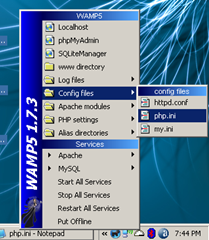
    Well, thanks to xdebug you can now debug, and you don’t need expensive or blotted IDE for that, just plain and simple Notepad++ can do the job.open php.ini in wamp

    In this post we will setup xdebug and DBGp plugin with Notepad++.

    Let’s start by installing xdebug.

    1. Download the latest release of xdebug for PHP version you are using.
    2. Copy xdebug dll file into php’s extension directory, in my case, as I use wamp, it is c:wampphpext .
    3. Now we need to configure xdebug so that it get recognized by PHP, so open php.ini
    4. Add following at the end of your php.ini file
      [xdebug]
      zend_extension_ts="c:/wamp/php/ext/php_xdebug-2.0.3-5.2.5.dll"
      xdebug.profiler_output_dir = "c:/wamp/tmp/xdebug"
      xdebug.profiler_output_name = "cachegrind.out.%p"
      xdebug.profiler_enable = 0
      xdebug.profiler_append=0
      xdebug.extended_info=1
      xdebug.remote_enable=1
      xdebug.remote_handler=dbgp
      xdebug.remote_mode=req
      xdebug.remote_host=127.0.0.1
      xdebug.remote_port=9000
      xdebug.idekey=xdebug
      xdebug.remote_log="c:/wamp/tmp/xdebug/xdebug_remot.log"
      xdebug.show_exception_trace=0
      xdebug.show_local_vars=9
      xdebug.show_mem_delta=0
      xdebug.trace_format=0
    5. Just create a folder ‘xdebug’ in ‘c:wamptmp’ folder.
    6. Finally restart Apache service .

    With these steps you have, finished xdebug installation, it is configured for profiling application and remote debugging. Check documentation to know what all these configuration do, and tweak according to your preference.

    (more…)

  • PHPCamp in Pune Mirror

    camping to connect

    News about PHP and PHPCamp was published in today’s Pune Mirror.

    Their is just one mistake though, MySpace[:( ]  is not in PHP. It’s my mistake, I conveyed the wrong information while disscussing[i still can’t figure out from where ‘myspace is in php’ came to my mind] with reporter, stupid me 🙁 .

    I regret not saying Yahoo Answers or Wikipedia as an example instead of MySpace.

  • Easy File Uploading Solution For PHP

    Uploading files/images is a task that is required in almost all web applications.

    While uploading file is a very simple task, still lot of beginners in PHP get stuck in this step. So in this post I decided to share the functions I learned while I was a beginner, and I still continue to use them because of it’s simplicity and usefulness.

    For all my file uploading needs I use the class.upload.php written by Colin Verot. Ok, I know all about PHP functions like move_uploaded_file() and is_uploaded_file(), still I prefer to use class.upload.php file because, this file provides me with good set of image manipulation functions along with a neat way to know when a file has been uploaded.

    So, let’s get started on, how to easily upload a file in PHP.

    First, let’s create a simple HTML form for uploading files.

     <form action="file-upload.php" method="post" enctype="multipart/form-data">
    
      Upload file: <input type="file" name="fileupload">
    
                      <input type="submit" value="save">
    
     </form>

    It is important to note that the form’s enctype is  multipart/form-data. This a place where novice developers make lot’s of mistake, they will forget to add enctype attribute to form and them spends hours thinking why they are not able to upload files or images.

    Now, that we have a form to upload files, let’s see how we can handle file uploads on server.

    I am going to cover four scenario’s here.

    (more…)