Category: php

  • Drupal Form API : An Introduction

    Update : this article is only relevant to Drupal 5.x, with coming of Drupal 7 this is completely out dated.

    I am guessing you must have created lot’s of html forms before, now you have started using Drupal and wondering how to create forms in Drupal and process them. If this is so then read on….

    What is Drupal Form API?

    Drupal form api, is nothing but a set of functions(off-course, that’s what api means) provided by Drupal as part of core functionality, since version 4.7, for us Drupal developers to create, validate and process our html forms, in a secure manner. When i say secure, i mean that you form data is almost free from injection attacks, but you do need to validate this data as per your own application requirements.

    It essentially means we will be creating arrays with relevant data and Drupal’s form generation engine will generate the html form for us.

    Ok, so what?

    I can create my own forms using html, why should i care about Drupal’s form api?

    Simple, if you want to extend the forms provided by other Drupal modules or Drupal itself(which you will have too, most of the time), with out actually modifying their code, then use Drupal’s form api.

    See if we want to use the benefits of modularity Drupal provides we should be able to modify the forms created by others to suit our needs.

    Well you must be wondering, this can be done by editing the code provided by the module. Sure you can do that, but in the process you loose the ability to upgrade that module when a new version comes along, because upgrading means porting all those changes again, now you are stuck.

    On the other hand if you have your own module, using form api, then all you need to it is just modify in you source files, while you can simple upgrade the module without worrying about loosing your changes.

    This also means you can split you form in many usable components and the piece them together for end user. This will give you reusability benefits that we programmers strive for.

    Not yet convinced…

    Let me see what i can do about that.. Ok let’s try this line of thought, when you used to create html forms of similar types, one after other from one project to other did you ever thought their should be a form generator, where you specify the parameter and it automatically generates the form for you. If yes then, consider your wish granted as Drupal’s Form API is one such thing that makes form creation an easy task.

    Ok, now i am assuming that you understood the importance of form api, then next thing to do is to understand how Drupal process the forms. When you understand the flow, you can control it. So let’s get on to it.

    Drupal Form process flow
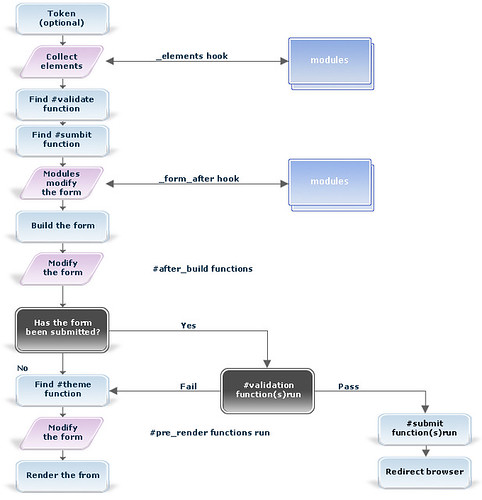
    Drupal Form Api

    (more…)

  • ADS: Automatic Deployment Script

    Automatic Deployment

    Note for lazy people : download ADS from Source forge now.


    Description

    Automatic Deployment Script is a tool to help web developers who use SVN for version control. It automatically updates the demo server with changes as soon as they commit changes to repository.

    It makes our life easier as web developer, when we have to give demo to clients frequently, and more then one person working on project, it is very hard to keep track of all the changes. To solve these, ADS employs svn hook’s to execute itself when an commit is detected by svn repository. It also sends emails to developers and testers when it successfully uploads files to server.

    Even if it fails to upload the files for some reason, we still have a place where all the files that has been changed are exported so one can easily upload the files manually.

    After successful upload

    Features

    • Exports only those files that has been changed during a commit.
    • FTP the file to demo server.
    • sends emails to developers and testers, or anyone you wish to.
    • it sends list of files that has been exported as attachment.
    • it sends two mails, one before deployment and other after deployment.
    • it keeps a detailed log of all the activity it does.
    • Easy to backtrack the steps.
    • Exports changes in only those repository which are set for use with ADS.

    (more…)

  • akWpUploader: Alternative WordPress Image Uploader

    For those in hurry, download the latest version of [download#2#nohits] from wordpress plugin page.

    UPDATE (25 August 2009): I have released the version 1.1.0 and made it comaptible with WordPress 2.8.

    UPDATE: I have released 0.7.1 of this plugin, with this i consider it to be good enough for general uses, Please help me test it so that we can together release version 1.0 of this plugin soon.

    I was fed up with the wordpress image uploader’s inability to properly resize the images. I was posting pictures of Rangpanchami in my office blog but image would just not resize properly.

    So i decided to create this akWpUploader: alternative image uploader for wordpress which uses Flickr.com’s web services to attach images on the blog post. Initially i wanted to use rss feed that Flickr provides, but found it very restrictive so i went ahead to use flickr Api, which has been simplified by Dan Coulter who wrote easy to use phpFlickr wrapper class. This plugin is not meant to replace the original uploader but to complement it by providing additional missing functionalities. Their was a need for some such plugin as is evident from following wordpress feature enhancement request Idea:Image Handling.

    How it works?

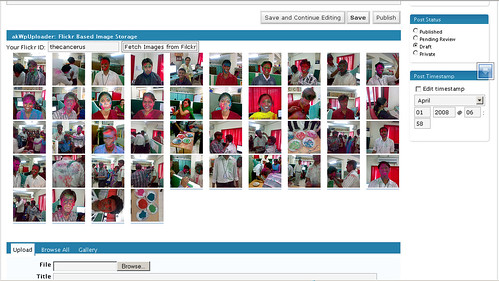
    All you need to do is type your Flickr user id and it will fetch all the photographs that you have published on the Flickr, you click on the image that you want to insert into the editor, select the option for image size to include in the editor. It will take the title, description form Flickr and attach image from Flickr in the editor. Simple isn’t ? 😉
    akWpUploader

    I have cheated here 😉 Cheating, No More 🙂

    Update : their is one more additional step involved now, you first select type the username, akWpuploader will fetch the tags and photo sets that you have created, once you select the option you can get the images from the Flickr.

    How to install

    This is very simple task, just upload the “akwpuploader-alternative-wordpress-image-uploader” folder to “wp-content/plugins/” folder, care must be taken to ensure that folder name is kept as it is.

    Then go to plugins section of the website and activate the plugin and you are done.

    This plugin shows itself when you create new post, just below the editor in wordpress 2.3 and below, It shows itself between Advanced options and categories in wordpress 2.5.

    Limitations

    As it is a Beta release it may have bugs, it still lacks some features and it may crash.

    To Do

    1. To choose the size that we want to display in blog instead of just small thumbnail that is currently being used
    2. Similar to wordpress uploader, ability to choose whether to link or not, and also to take user to wordpress blog page or directly to image.
    3. Ability to select image sets from Flickr.
    4. Ability to select images based on tags.
    5. Pagination.
    6. Ability to clear the images from the selection
    7. Ability to specify your own details like title and description for a photo instead of using the one on Flickr.
    8. Ability to Upload the images to Flickr itself.

    If you have any ideas that you want to see with this plugin please let me know.

    Fixed : Just released a new version to fix the issues mentioned by matthew and kimharding in comments please help me test it further so that i can release a stable version soon.

    Fixed : With release of 0.7.1, i have fixed the issue mentioned by kimchi39 in comments.

    Update(5th July 2008) : Released 1.0.0 a stable version after lot’s of testing.

    Update (25 August 2009): I have released the version 1.1.0 and made it comaptible with WordPress 2.8.

  • New Zealand Daylight Savings Time (DST) has changed

    just wanted to post a quick note about this, originally it was supposed to finish on 16th march but it has being extended  to 3rd April.

    if your php script is giving you one hour late time then here is the solution

    just update your timezone database from  http://pecl.php.net/package/timezonedb

    you might need to compile it for your system, alternatively you can also update the php to it’s latest release.

    here is the link if you need more  info http://pecl.php.net/bugs/bug.php?id=12151 .

    Enjoy!!!

  • Joomla 1.0.x : How it works

    I gave this presentation in skills camp pune last year. I am sharing the slides here, in hope some one still find it useful even though joomla 1.5 is released last month.

    In this presentation I talked about how Request flow in a joomla application. I also explained the entity relationship diagram (ERD) of joomla, that i created by reverse engineering the joomla database,  reading the code and off course searching the internet.

    The most difficult part to understand was user rights management part of the database. It is based on phpGACL library, reading their help files helped get clear idea about right management in joomla. Access Control chapter in joomla website also helped.


    and here is the recorded session of same.

    Joomla as a framework

    [utube]3k4ioE9QGG8[/utube]

    (more…)

  • Enterprise PHP


    I will not say anything but let Ivo Jansch speak for us in this slide show.