Category: php

  • Fix ‘Blank page’ problem aka White Screen of Death

    This is another interesting problem that baffles the novice PHP programmers.

    We make a quick change, and upload the file to webserver, we access the webapge and your are presented with a blank white page, aka ‘white screen of death’. It does not even show any error message.

    We end up thinking what happened, we refresh the webpage but usually nothing changes.

    Why this happens?

    This happens because your host has switched off error reporting(for good reasons). So whenever their is a fatal error in your PHP script, and you have error reporting turned off you are presented with white screen of death.

    (more…)

  • Enable Your Joomla To Write In Hindi, Marathi, Bengoli, Gujarati, Malyalam, Telugu and Punjabi

    UPDATE: This article is compatible only upto Joomla 1.5.12. I will make it compatible to latest version of Joomla as soon as i have time. Thank you.


    Recently I was required to give a presentation to an agricultural college, they wanted to create a website for their college in Marathi, which resulted in akIndicPlugin for tinyMCE as Joomla uses it as default editor.

    Here is how you can enable Joomla to write in Indian languages.

    Step 1:Install akIndicPlugin for tinyMCE

    Upload files to webserver,

    • Download the akIndicPlugin
    • Extract the archive using winzip etc. in a folder named akindicplugin
    • Now FTP the akindicplugin  folder and all files inside it, to “pluginseditorstinymcejscriptstiny_mceplugins” in case of Joomla 1.5.x or “mambotseditorstinymcejscriptstiny_mceplugins” in case of Joomla 1.0.x, using Filezilla.

    Modify the ‘tinymce.php‘ file

    • Open tinymce.php file in “editorstinymce” in  Notepad++ or your favorite editor.
    • In Joomla 1.0.x find $buttons2     = implode( ‘, ‘, $buttons2 ); or goto line number 250. In case of Joomla 1.5.x  find $buttons2[] = ‘forecolor’; or goto line number 190.
    • Add following lines at specified line numbers
    $plugins[]            = 'akindicplugin';
      $buttons3[]            = 'akindicplugin';
    • Save the file, and upload to webserver.

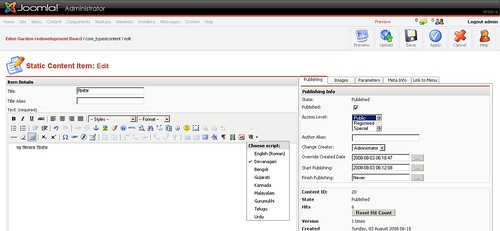
    Once you are done, login to Joomla administrator panel and check tinyMCE, if you see a button on tinyMCE toolbar, Congratulations! you have finished the first step.

    akIndicPlugin for tinyMCE in joomla

    (more…)

  • Solution To Session Timing Out Intermittently

    A month back I had written about why your session might not be setting, even though you had set every thing as per the book. This time I am writing about a new problem that I faced with sessions.

    The Problem

    I recently faced a problem, where for some reason website would not remember session data for some users. They Log in, get to the home page, but the moment they click any other link they are logged out and taken back to login page.

    Interesting thing is, this happens for both Firefox and Internet Explorer.

    When I used the users credentials I was able to log in perfectly on my machine. When I passed him my credentials to try, and it failed on his machine.

    I have faced this problem with both Joomla and Codeigniter framework.

    Initially we thought it would be a problem with  just his browser’s cookie setting, so we got him to reduce the web browsers security setting to low, So that it allows for cookie acceptance.  As it turns out, it was not the problem with cookies either. (more…)

  • CodeIgniter is the fastest PHP framework

    Ekerete Akpan, from AVNet Labs, released the results of his small experiment to measure the performance of four PHP frameworks.He used requests/sec as a performance yardstick, what it tells is that number of request your webserver can handle, if you use one of these frameworks.php-framework-comparison-benchmarksAnd the result of all his test says that between Zend Framework,CakePHP and CodeIgniter, CodeIgniter is the fastest one.This test validates my choice for going with CI as framework, instead of Zend.For detailed analysis checkout the original post.Update: Even Rasmus Lerdorf prefers CI over all the frameworks avilable.

  • PHP Sucks

    It seems like their is a new Cool wave flowing in the developer community which involves finding reasons to say PHP sucks.

    Everyone worth his salt is trying to get ahead in finding new reasons to put it down.

    So I thought why not I compile some of the good articles from bunch of these people.

    Here is my favorite quote from one such article:

    So here’s my problem, based on my limited experience with PHP (deploying a couple of free apps to do this and that, and debugging a site for a non-technical friend here and there): all the PHP code I’ve seen in that experience has been messy, unmaintainable crap. Spaghetti SQL wrapped in spaghetti PHP wrapped in spaghetti HTML, replicated in slightly-varying form in dozens of places.
    By Tim Bray

    (more…)

  • Reading/Parsing Excel Spreadsheet using PHP

    This is second article in the series of common PHP problems that a beginner faces. You can check the first article Warning: header data already sent.

    In this tutorial we will see, how we can easily parse or read an Excel sheet and display the parsed data to user. Even though we are going to display the output, the other extension of this technique is that we can parse an excel sheet filled with data, in set format, and convert it into SQL statement and insert the data into database. Now this is an easy task on an windows based server, to do the same thing in Linux we need to use some other libraries.

    This tutorial assumes that you know PHP.

    (more…)

  • 5 key skills of a successful web application developer

    Most probably you will be knowing about all these skills already, it is common sense, still I have found so many developers who just know just one server side language(usually java or .net) and then they think themselves as superman/superwoman.

    In web application development, that is just one thing. You need to know about lot more things before you can consider yourself successful.

    So, if you know them already that’s good, you don’t need to read any further otherwise continue reading to know why each of these skills are important for you(the web developer).

    Here are the skills

    1. the structure : HTML
    2. the presentation: CSS
    3. the behavior: JavaScript

    With these three skill you have ability to become the super cool static website developer or a front end developer

    1. the database: SQL
    2. the server-side language : PHP( other options are JSP/ASP/PERL/RUBY choice is yours, as all the fight for best happens here)

    These two skill will make you a web developer.

    All five of these skills will make you a most prized web developer, in your organization.

    (more…)

  • Warning: headers already sent

    When I was learning PHP their were few things that had stumped me, I would usually take it hours to solve them if not days. Now I have grown up, and I realize that those were the basic things that should have been mentioned in the PHP manual, but they were not.

    Today I am going to write about one such annoying problem that almost always comes in the way of PHP developers at least once.

    Warning: Cannot modify header information – headers already sent by (output started at C:wampwwwaktesterror.php:2) in C:wampwwwaktesterror.php on line 4

    Warning: session_start() [function.session-start]: Cannot send session cookie – headers already sent by (output started at C:wampwwwaktesterror.php:2) in C:wampwwwaktesterror.php on line 3

    This is “header already sent” warning message, that we get whenever we try to redirect a user to some other page or location, when we try to set a cookie or if we try to start a session. Once we get this warning we know that page won’t redirect, session won’t start or cookie’s sent to user, So we can’t even ignore them.

    Before we see the solutions to resolve this warning let’s see the source code of the error.php file that I used to generate this error.

    
    <?php
    session_start();
    header("location:http://localhost/");
    ?>

    Please notice an empty line before “<?php”, this is the cause of errors in his page.

    (more…)

  • How to create multicolor text image on the fly

    This tutorial explains how we can create dynamic images with multicolor text in PHP.

    We will need GD library and FreeType library to be enabled for this functionality to work.

    I have assumed that you already know PHP, and understand how to use it.

    Check the example below to see what we want to create.

    Amit Singh

    Before we start the tutorial, let’s check if GD library support is available on your system or not.

    Type phpinfo(); in a php file, and check the output.

    phpinfo_gd

    You should see something like that you can move forward, else goto php.ini and remove the comment from extension=php_gd2.dll. Now check phpinfo() again to verify that every thing is ok.

    Now, let see how we can create dynamic images using PHP.

    CODE

    Header ("Content-type: image/png");
    
    putenv('GDFONTPATH=' . realpath('.'));
    $font = 'nevis.ttf';
    $fontSize=20;//in point;
    
    $title1= 'Amit';
    
    $title2= 'Singh';
    
    $str=$title1.'   '.$title2;
    
    $onecharwidth  = imagefontwidth($font)*($fontSize/8);
    
    $totalwidth  = $onecharwidth * strlen($str);
    
    $height = (imagefontheight($font)*($fontSize/8))*2;
    
    $img_handle = imagecreatetruecolor($totalwidth, $height);
    
    $white = imagecolorallocate($img_handle, 255, 255, 255);
    
    imagefill($img_handle, 0, 0, $white);
    
    $black = imagecolorallocate ($img_handle, 0, 0, 0);
    
    $gray = imagecolorallocate ($img_handle, 100, 100, 100);
    
    imagettftext($img_handle, 20, 0, 10, 20, $black, $font, $title1);
    
    $posarr=imagettfbbox(20, 0,$font, $title1);
    
    imagettftext($img_handle, 20, 0, $posarr[2]+$onecharwidth, 20, $gray, $font, $title2);
    
    imagepng ($img_handle);
    
    imagedestroy ($img_handle);

    (more…)
  • Simplified AJAX For WordPress Plugin Developers using Jquery

    I am assuming you know how to write a WordPress plugin, and now you are wondering how to use ajax to add that sexy feature that will make your plugin look a bit kool.

    I faced the same problem, with my akWpUploder plugin. I googled but could not find anything interesting, or should I say, simple way of adding ajax to my plugin. So I dig into the WordPress code base for solution, as auto-saving feature of WordPress was one such thing that I wanted to use.

    There I found what I was really looking for, a very simple way of using Ajax to get things done.

    Problem: How to use WordPress functions in your plugin when using ajax

    Are you satisfied with your knowledge? No, then spent 15 minutes every day on PHPCamp a knowledge-sharing website for our own PHP community

    Let me explain the problem first, while I was working on my plugin I needed to insert the photo data into the database. To do this I needed to use WordPress database functions, but the way I knew to use ajax(i.e. creating a separate PHP file that handles the ajax request), it was bit difficult and messy. It would have involved either making a direct connection with the database or including the WordPress config file.

    I was not happy with either of these options, I needed a simpler solution.

    (more…)