Blog

  • Fix ‘Blank page’ problem aka White Screen of Death

    This is another interesting problem that baffles the novice PHP programmers.

    We make a quick change, and upload the file to webserver, we access the webapge and your are presented with a blank white page, aka ‘white screen of death’. It does not even show any error message.

    We end up thinking what happened, we refresh the webpage but usually nothing changes.

    Why this happens?

    This happens because your host has switched off error reporting(for good reasons). So whenever their is a fatal error in your PHP script, and you have error reporting turned off you are presented with white screen of death.

    (more…)

  • Enable Your Joomla To Write In Hindi, Marathi, Bengoli, Gujarati, Malyalam, Telugu and Punjabi

    UPDATE: This article is compatible only upto Joomla 1.5.12. I will make it compatible to latest version of Joomla as soon as i have time. Thank you.


    Recently I was required to give a presentation to an agricultural college, they wanted to create a website for their college in Marathi, which resulted in akIndicPlugin for tinyMCE as Joomla uses it as default editor.

    Here is how you can enable Joomla to write in Indian languages.

    Step 1:Install akIndicPlugin for tinyMCE

    Upload files to webserver,

    • Download the akIndicPlugin
    • Extract the archive using winzip etc. in a folder named akindicplugin
    • Now FTP the akindicplugin  folder and all files inside it, to “pluginseditorstinymcejscriptstiny_mceplugins” in case of Joomla 1.5.x or “mambotseditorstinymcejscriptstiny_mceplugins” in case of Joomla 1.0.x, using Filezilla.

    Modify the ‘tinymce.php‘ file

    • Open tinymce.php file in “editorstinymce” in  Notepad++ or your favorite editor.
    • In Joomla 1.0.x find $buttons2     = implode( ‘, ‘, $buttons2 ); or goto line number 250. In case of Joomla 1.5.x  find $buttons2[] = ‘forecolor’; or goto line number 190.
    • Add following lines at specified line numbers
    $plugins[]            = 'akindicplugin';
      $buttons3[]            = 'akindicplugin';
    • Save the file, and upload to webserver.

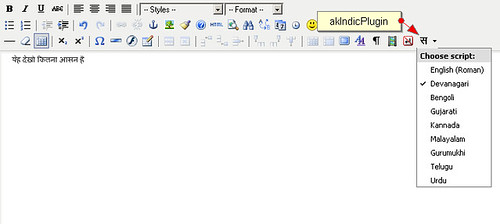
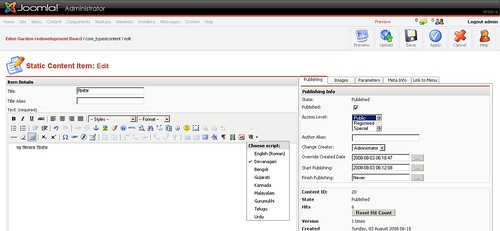
    Once you are done, login to Joomla administrator panel and check tinyMCE, if you see a button on tinyMCE toolbar, Congratulations! you have finished the first step.

    akIndicPlugin for tinyMCE in joomla

    (more…)

  • akIndicPlugin For Writing In Hindi, Gujarati, Malayalam And Other Indian Languages

    For those in hurry,  download [download#13#nohits] now.

    akIndicPlugin was born, when I needed to demo a website in Hindi. This plugin is adapted from a WordPress plugin Indic by nbachiyski, which is is actually based on Gamabhana library written by Omkar Joshi.

    I adapted it so that I can use it in my websites.

    As it is based on Gamabhana, it currently supports following 8 Indian languages

    1. Devanagari(Hindi)
    2. Bengoli
    3. Gujarati
    4. Kannada
    5. Malayalam
    6. Gurumukhi
    7. Telgu
    8. Urdu

    It is released under GPL, so go ahead and use it as you see fit in your web application. Writing in India languages could not get easier then this.
    akIndicPlugin

    How To Use

    Copy the files in plugin directory of your tinyMCE folder and when you are initializing tinyMCE just add  akIndicPlugin to list of plugins to load and also to list of buttons.

    For example

    tinyMCE.init({
    		theme : "advanced",
    		language : "en",
    		mode : "specific_textareas",
    		safari_warning : false,
    		plugins : "advlink, advimage,  preview, visualchars, media, nonbreaking, akIndicPlugin",
    		theme_advanced_buttons3_add : "styleprops, visualchars, media, nonbreaking, akIndicPlugin",
    		debug : false,
    		fullscreen_settings : {
    			theme_advanced_path_location : "top"
    		}
    	});

    Simple isn’t it?

    Troubleshooting

    If characters doesn’t show properly in your browser you can find some helpful hints in this Wikipedia page( “Multilingual support (Indic)”).

    If you are looking for key sequence to which letter corresponds, have a look at the nice table at the Gamabhana library site. Devanagari is used there, but the same logic applies to all other scripts.

    akIndicPlugin currently supports only tinyMCE 2.x series, stay tuned for tinyMCE 3.x support.
  • How To Install Group Policy Editor

    Since I started publishing my manual virus removal series lot’s of people asked me where about Group Policy Editor.

    For example In “How to remove antivirus XP 2008”  MK asked

    when i go to start run gpedit.msc my computer says windows can not find it ???

    So I thought instead of replying to in the comments itself I will post the solution here and refer everyone to this post 🙂

    As I had already mentioned in my first newfolder.exe virus removal article you can download the french version of gpedit.msc from bogdan.org.ua.

    Once you download it you can install it as follows. I am quoting directly from that article itself

    However, here are some short instructions in English for manual MMC snap-in installation (batch file from the archive does everything automatically, but you’ll have to edit-verify the batch file first):

    * put these files: (appmgmts.dll, appmgr.dll, fde.dll, fdeploy.dll, gpedit.msc, gpedit.dll, gptext.dll) into %SystemRoot%system32 folder

    * put these files: (system.adm, inetres.adm, conf.adm) into %SystemRoot%system32GroupPolicyAdm (create if this folder doesn’t exist)

    * finally, run these commands one by one in the CMD window:

    regsvr32 gpedit.dll
    regsvr32 fde.dll
    regsvr32 gptext.dll
    regsvr32 appmgr.dll
    regsvr32 fdeploy.dll

    That should do it.

    You should read the article at Bogdan for more detailed instructions.

    As for french, most of the articles that I have written I have attached the image that shows the exact line that needs to be modified, you can use them as reference.

    I hope this will help you install the gpedit.msc on your system.

  • Is Google TechTalk Rss Feed Hacked?

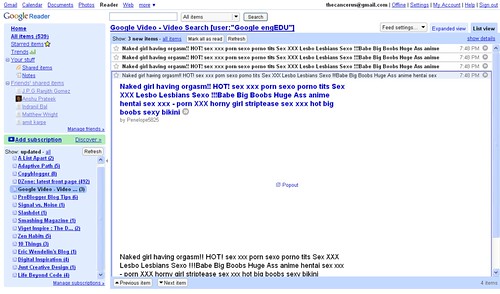
    I was reading my RSS feeds on google reader. When all of sudden I saw4 new videos on the google talk RSS feed from Youtube.

    I was bit surprised as I had just cleared the bunch here is what I saw

    Google Reader (539)_1216826312447

    What is happening with Google, first spammers were able to  manipulate the google trends and now this?

    Is it possible to hack someone’s RSS feed?

    What do you think would have happened here?

  • Call for PHP speakers

    We are looking for passionate PHP speakers for PHPCamp which is being organized by fellow PHP enthusiast, on 20th September 2008 in Pune, India.

    This is an ad-hoc gathering of passionate developers and newbies, with one common interest. We all want to talk and listen about PHP based development. We want to learn new things, we want to know what our fellow developers are upto. What is the hottest thing they have done.

    So if you have anything to talk on PHP, CMS, frameworks, coding standard’s, development tools, OOPS, PEAR,PECL, MySQL, design, anything and everything that can help a PHP developer and help you become thought leader, propose your session now.

    This event is 100% free to attend and hence speakers will have to make their own arrangements for travel. Even then this will be a great place to speak and get recognition among the peers instantly.

  • Solution To Session Timing Out Intermittently

    A month back I had written about why your session might not be setting, even though you had set every thing as per the book. This time I am writing about a new problem that I faced with sessions.

    The Problem

    I recently faced a problem, where for some reason website would not remember session data for some users. They Log in, get to the home page, but the moment they click any other link they are logged out and taken back to login page.

    Interesting thing is, this happens for both Firefox and Internet Explorer.

    When I used the users credentials I was able to log in perfectly on my machine. When I passed him my credentials to try, and it failed on his machine.

    I have faced this problem with both Joomla and Codeigniter framework.

    Initially we thought it would be a problem with  just his browser’s cookie setting, so we got him to reduce the web browsers security setting to low, So that it allows for cookie acceptance.  As it turns out, it was not the problem with cookies either. (more…)

  • How to Remove Antivirus XP 2008

    I hate these spywares, they keep finding ways to sneak into my system every now and then.

    Earlier it was “New Folder.exe” and then these other irritating viruses, and now Antivirus XP 2008.

    Thanks god this time my Avast was able to detect the virus and delete it. But the real problem was, the moment this rootkit  virus was detected and deleted, Antivirus XP would again install this rootkit virus.

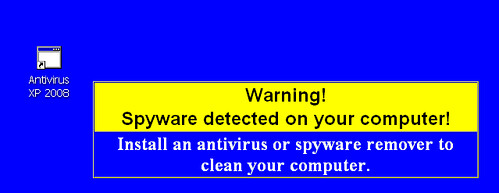
    Antivirus XP 2008 wallpaper

    Initially I thought that a boot time scan would be sufficient to remove this virus from my system, though it does not turned out that effective even though Avast removed more then 240 infected files.

    The reason turned out to be Antivirus XP 2008, it was running at boot time resulting in re-infection.

    So I finally had to get into action, to take back the control of my PC.

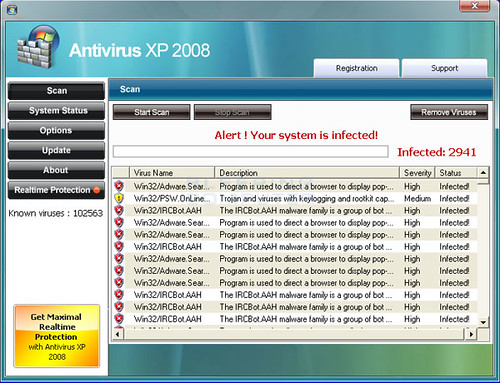
    Antivirus XP 2008 GUI

    Here is step by step account of what I did(remember all this was done immediately after boot-time scan by Avast) to uninstall and remove it from my PC.

    (more…)

  • OpinionBar : Firefox toolbar for Digg, Dzone and StumbleUpon

    Update: due to copyright issues with the name of this plugin, i have decided to discontinue the plugin. Please email me if you need the source code of this Firefox plugin.

    Have you ever faced a situation where, you read an article, liked it but forgot to vote for it on DZone or Digg, simply because the owner of website has not put the relevant code on the web page.

    Well I did. Their have been times when I wanted to vote for an article, but didn’t because of this.

    So I created this Firefox toolbar to solve my problem.

    What is OpinionBar

    OpinionBar: Firefox Toolbar for digg, dzone and stumbleuponIt is a Firefox toolbar extension, which shows the number of votes and comments that an article(a webpage) has received. Currently it aggregates this data from StumbleUpon, Digg and Dzone.

    It also provides a quick way to show your own opinion, to others on these services without you having to click on back button.

    OpinionBar Firefox tool bar for digg, dzone and stumbleupon

    (more…)

  • Creating multiple profiles in Firefox

    Recently I decided to start playing with Firefox extensions, and I needed to create a DEV profile for myself.

    As usual I googled and found a good article on lifehacker by Gina Trapani, I read it. I followed the steps mentioned and I realized that it is not working.

    After some tinkering and guess work I found that article had one crucial step missing(may be not as article is almost year old, and things may have changed since).

    So I thought I will quickly write those steps down, for every one.

    (more…)