Category: how too?

  • Integrating With Twitter API In CodeIgniter

    I needed to integrate Twitter API in one  of my web applications which uses CodeIgniter framework.


    As their is no direct library available in CI for twitter integration, at first go this might look very difficult, but it is really simple.


    Here is how you can do it..

    1. First download the  Twitter class for PHP.
    2. Put the class.twitter.php file in application/libraries folder.
    3. Rename class.twitter.php to twitter.php ( to make it compatible with CI naming conventions).
    4. Open twitter.php file and set following variables
    var $username=’'; //twitter username
    var $password=''; // twitter password
    var $user_agent=''; //an identifier for twitter preferably email address
    Are you satisfied with your knowledge? No, then spent 15 minutes every day on PHPCamp.net a knowledge sharing website for our own PHP community

    If you have followed these steps your integration is almost complete, now all you need to do is use the twitter library, here is an example to get you started 🙂

     $this->load->library('Twitter');
     $msg=’Just Integrated Twitter with CodeIgniter ’;
     $this->twitter->update($msg);

    By the way you can follow me on twitter @thecancerus.
  • Debugging PHP using Xdebug and Notepad++ : Part I

    I am sure all of you have used ‘echo’ and ‘print_r’ to debug PHP.

    We all know that this way debugging is hard and you need to remember to remove them from production server.

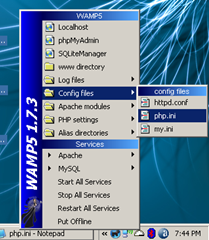
    Well, thanks to xdebug you can now debug, and you don’t need expensive or blotted IDE for that, just plain and simple Notepad++ can do the job.open php.ini in wamp

    In this post we will setup xdebug and DBGp plugin with Notepad++.

    Let’s start by installing xdebug.

    1. Download the latest release of xdebug for PHP version you are using.
    2. Copy xdebug dll file into php’s extension directory, in my case, as I use wamp, it is c:wampphpext .
    3. Now we need to configure xdebug so that it get recognized by PHP, so open php.ini
    4. Add following at the end of your php.ini file
      [xdebug]
      zend_extension_ts="c:/wamp/php/ext/php_xdebug-2.0.3-5.2.5.dll"
      xdebug.profiler_output_dir = "c:/wamp/tmp/xdebug"
      xdebug.profiler_output_name = "cachegrind.out.%p"
      xdebug.profiler_enable = 0
      xdebug.profiler_append=0
      xdebug.extended_info=1
      xdebug.remote_enable=1
      xdebug.remote_handler=dbgp
      xdebug.remote_mode=req
      xdebug.remote_host=127.0.0.1
      xdebug.remote_port=9000
      xdebug.idekey=xdebug
      xdebug.remote_log="c:/wamp/tmp/xdebug/xdebug_remot.log"
      xdebug.show_exception_trace=0
      xdebug.show_local_vars=9
      xdebug.show_mem_delta=0
      xdebug.trace_format=0
    5. Just create a folder ‘xdebug’ in ‘c:wamptmp’ folder.
    6. Finally restart Apache service .

    With these steps you have, finished xdebug installation, it is configured for profiling application and remote debugging. Check documentation to know what all these configuration do, and tweak according to your preference.

    (more…)

  • Step By Step Guide To Install Memcache On Linux

    This post is more like a note to me, so that in future I can look up for steps involved in installing memcache on Linux servers like Centos or RHEL.

    Those of you who follow me on twitter, will know that me and my friends spends hours trying to install memcache on one of our web server. Normally this is a five minute job, but unfortunately for us those tricks did not work out.

    So if you have tried YUM and APT-GET and still could not install the memcache then read on, to find the alternate( read manual, without magic ) way of doing it.

    When we talk about Memcache their two things that needs to be installed

    1. Memcache Daemon know as memcached, and
    2. Memcache client for your programing language, in this case PHP.

    (more…)

  • Easy File Uploading Solution For PHP

    Uploading files/images is a task that is required in almost all web applications.

    While uploading file is a very simple task, still lot of beginners in PHP get stuck in this step. So in this post I decided to share the functions I learned while I was a beginner, and I still continue to use them because of it’s simplicity and usefulness.

    For all my file uploading needs I use the class.upload.php written by Colin Verot. Ok, I know all about PHP functions like move_uploaded_file() and is_uploaded_file(), still I prefer to use class.upload.php file because, this file provides me with good set of image manipulation functions along with a neat way to know when a file has been uploaded.

    So, let’s get started on, how to easily upload a file in PHP.

    First, let’s create a simple HTML form for uploading files.

     <form action="file-upload.php" method="post" enctype="multipart/form-data">
    
      Upload file: <input type="file" name="fileupload">
    
                      <input type="submit" value="save">
    
     </form>

    It is important to note that the form’s enctype is  multipart/form-data. This a place where novice developers make lot’s of mistake, they will forget to add enctype attribute to form and them spends hours thinking why they are not able to upload files or images.

    Now, that we have a form to upload files, let’s see how we can handle file uploads on server.

    I am going to cover four scenario’s here.

    (more…)

  • Fix ‘Blank page’ problem aka White Screen of Death

    This is another interesting problem that baffles the novice PHP programmers.

    We make a quick change, and upload the file to webserver, we access the webapge and your are presented with a blank white page, aka ‘white screen of death’. It does not even show any error message.

    We end up thinking what happened, we refresh the webpage but usually nothing changes.

    Why this happens?

    This happens because your host has switched off error reporting(for good reasons). So whenever their is a fatal error in your PHP script, and you have error reporting turned off you are presented with white screen of death.

    (more…)

  • Solution To Session Timing Out Intermittently

    A month back I had written about why your session might not be setting, even though you had set every thing as per the book. This time I am writing about a new problem that I faced with sessions.

    The Problem

    I recently faced a problem, where for some reason website would not remember session data for some users. They Log in, get to the home page, but the moment they click any other link they are logged out and taken back to login page.

    Interesting thing is, this happens for both Firefox and Internet Explorer.

    When I used the users credentials I was able to log in perfectly on my machine. When I passed him my credentials to try, and it failed on his machine.

    I have faced this problem with both Joomla and Codeigniter framework.

    Initially we thought it would be a problem with  just his browser’s cookie setting, so we got him to reduce the web browsers security setting to low, So that it allows for cookie acceptance.  As it turns out, it was not the problem with cookies either. (more…)

  • How to Remove Antivirus XP 2008

    I hate these spywares, they keep finding ways to sneak into my system every now and then.

    Earlier it was “New Folder.exe” and then these other irritating viruses, and now Antivirus XP 2008.

    Thanks god this time my Avast was able to detect the virus and delete it. But the real problem was, the moment this rootkit  virus was detected and deleted, Antivirus XP would again install this rootkit virus.

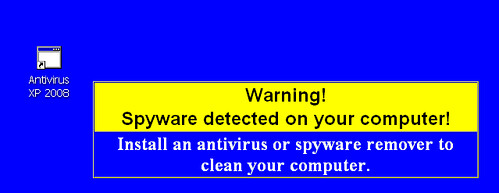
    Antivirus XP 2008 wallpaper

    Initially I thought that a boot time scan would be sufficient to remove this virus from my system, though it does not turned out that effective even though Avast removed more then 240 infected files.

    The reason turned out to be Antivirus XP 2008, it was running at boot time resulting in re-infection.

    So I finally had to get into action, to take back the control of my PC.

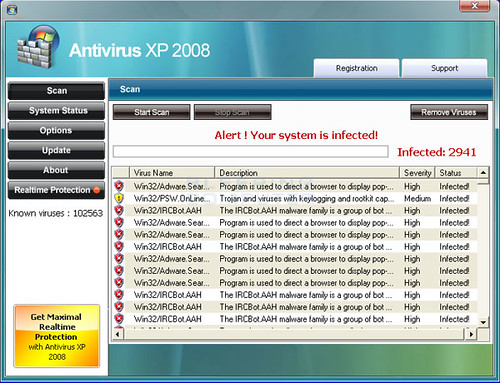
    Antivirus XP 2008 GUI

    Here is step by step account of what I did(remember all this was done immediately after boot-time scan by Avast) to uninstall and remove it from my PC.

    (more…)

  • How to stop regedit, taskmanager or msconfig from closing automatically

    Since i published my “How to remove new folder exe or regsvr exe or autorun inf virus” article many readers have asked me about how to prevent regedit, taskmanger, msconfig etc from closing withing second of it’s opening.

    Now i have to say as i have yet to face this issue personally myself, i am not really able to suggest anything but to recommend people to do a boot time scan from avast, and hope that fixes their problem.

    But after receiving a repeated request to fix this issue, i decided to write about the approach that i would take if i face this problem and to collaborate with you to solve your problem and in the process create a workable solution to fix this problem, once and for all.

    Symptoms of the problem that we are tying to solve,

    1. you open regedit, the regedit window flickers and closes again,
    2. you open taskmanager, window opens and immediately closes.
    3. you try to open msconfig, window closes the moment it opens.

    (more…)

  • Simplified AJAX For WordPress Plugin Developers using Jquery

    I am assuming you know how to write a WordPress plugin, and now you are wondering how to use ajax to add that sexy feature that will make your plugin look a bit kool.

    I faced the same problem, with my akWpUploder plugin. I googled but could not find anything interesting, or should I say, simple way of adding ajax to my plugin. So I dig into the WordPress code base for solution, as auto-saving feature of WordPress was one such thing that I wanted to use.

    There I found what I was really looking for, a very simple way of using Ajax to get things done.

    Problem: How to use WordPress functions in your plugin when using ajax

    Are you satisfied with your knowledge? No, then spent 15 minutes every day on PHPCamp a knowledge-sharing website for our own PHP community

    Let me explain the problem first, while I was working on my plugin I needed to insert the photo data into the database. To do this I needed to use WordPress database functions, but the way I knew to use ajax(i.e. creating a separate PHP file that handles the ajax request), it was bit difficult and messy. It would have involved either making a direct connection with the database or including the WordPress config file.

    I was not happy with either of these options, I needed a simpler solution.

    (more…)

  • How to remove new folder exe or regsvr exe or autorun inf virus

    I want to tell you a story, two days back i got affected by this virus very badly as it eat up all my empty hard disk space of around 700 MB 🙁 .

    I was surprised that my most reliable friend Avast, for the first time failed me in this war against viruses but then again avg and bitdiffender also failed against it. This virus is know popularly as regsvr.exe virus, or as new folder.exe virus and most people identify this one by seeing autorun.inf file on their pen drives, But trend micro identified it as WORM_DELF.FKZ. It is spreading mostly using pen drives as the medium.

    New folder.exe virus

    Well, so here is the story of how i was able to kill the monster and reclaim my hard disk space.

    Manual Process of removal

    (more…)