I want to tell you a story, two days back i got affected by this virus very badly as it eat up all my empty hard disk space of around 700 MB 🙁 .
I was surprised that my most reliable friend Avast, for the first time failed me in this war against viruses but then again avg and bitdiffender also failed against it. This virus is know popularly as regsvr.exe virus, or as new folder.exe virus and most people identify this one by seeing autorun.inf file on their pen drives, But trend micro identified it as WORM_DELF.FKZ. It is spreading mostly using pen drives as the medium.

Well, so here is the story of how i was able to kill the monster and reclaim my hard disk space.
Manual Process of removal
I prefer manual process simply because it gives me option to learn new things in the process.
So let’s start the process off reclaiming the turf that virus took over from us.
- Cut The Supply Line
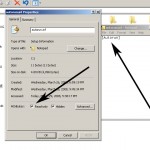
- Search for autorun.inf file. It is a read only file so you will have to change it to normal by right clicking the file , selecting the properties and un-check the read only option
- Open the file in notepad and delete everything and save the file.
- Now change the file status back to read only mode so that the virus could not get access again.
-
- Click start->run and type msconfig and click ok
- Go to startup tab look for regsvr and uncheck the option click OK.
- Click on Exit without Restart, cause there are still few things we need to do before we can restart the PC.
- Now go to control panel -> scheduled tasks, and delete the At1 task listed their.
- Open The Gates Of Castle
- Click on start -> run and type gpedit.msc and click Ok.
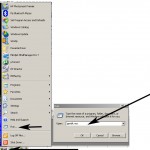
- If you are Windows XP Home Edition user you might not have gpedit.msc in that case download and install it from Windows XP Home Edition: gpedit.msc and then follow these steps.
- Go to users configuration->Administrative templates->system
- Find “prevent access to registry editing tools” and change the option to disable.
-
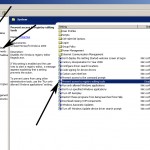
- Once you do this you have registry access back.
- Launch The Attack At Heart Of Castle
- Click on start->run and type regedit and click ok
- Go to edit->find and start the search for regsvr.exe,
-
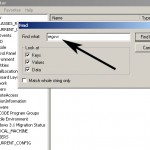
- Delete all the occurrence of regsvr.exe; remember to take a backup before deleting. KEEP IN MIND regsvr32.exe is not to be deleted. Delete regsvr.exe occurrences only.
- At one ore two places you will find it after explorer.exe in theses cases only delete the regsvr.exe part and not the whole part. E.g. Shell = “Explorer.exe regsvr.exe” the just delete the regsvr.exe and leave the explorer.exe
- Seek And Destroy the enemy soldiers, no one should be left behind
- Click on start->search->for files and folders.
- Their click all files and folders
- Type “*.exe” as filename to search for
- Click on ‘when was it modified ‘ option and select the specify date option
- Type from date as 1/31/2008 and also type To date as 1/31/2008
-
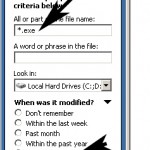
- Now hit search and wait for all the exe’s to show up.
- Once search is over select all the exe files and shift+delete the files, caution must be taken so that you don’t delete the legitimate exe file that you have installed on 31st January.
- Also selecting lot of files together might make your computer unresponsive so delete them in small bunches.
- Also find and delete regsvr.exe, svchost .exe( notice an extra space between the svchost and .exe)
- Time For Celebrations
- Now do a cold reboot (ie press the reboot button instead) and you are done.
I hope this information helps you win your own battle against this virus. Soon all antivirus programs will be able to automatically detect and clean this virus. Also i hope Avast finds a way to solve this issues.
As a side note i have found a little back dog( winpatrol ) that used to work perfectly on my old system. It was not their in my new PC, I have installed it again , as I want to stay ahead by forever closing the supply line of these virus. You can download it form Winpatrol website.
UPDATE : Avast Boot Time Scheduling

Check out How to stop regedit, task manager and msconfig from closing automatically if your regedit or msconfig closes automatically.
Comments
177 responses to “How to remove new folder exe or regsvr exe or autorun inf virus”
I was not able to get the registry editor. It displays some error message when i give regedit in the Run.
Marvellous! Step by step approach and very clear.
Hats off for a good job. 🙂
@bala : first follow the steps specified in “Open The Gates Of Castle” ie start the gpedit.msc and you can enable the regedit.
or you can tell me error message i can tell you exactly what to do.
@sangeetha : Thanks 😀
Excellent friend ,i was dependent on AVAST ,unfortunately it failed.
Thanks for help
God bless you
hey guys i am facing a problem in opening the gates to the castle part.wen i run gpedit.msc it says cannot find gpedit.msc.wat do i do?plz help out
mathew which operating system you are using..?
i am using windows xp amit.
your windows xp might be home edition, which does not have the gpedit.msc installed by default you can download it from this url
Windows XP Home Edition: gpedit.msc
Thanks man i dowmloaded it .now wat is the next step?how do i install it?
dude i installed it but the whole thing is in french.cant understand a thing
it is specified in that article itself, anyways i will quote relevant section here
as for french, just follow the screen shot i have attached edit at the line i have specified. In that case you wont have to read it. 🙂
Hi there
I am facing the same problem and am getting pissed off as no antivrus s/w detects the virus.As u said it is using pendrives as medium.I tried following your steps and there and i found no regsvr in the msconfig.
I am using windows vista home premium.
Any help is much appreciated.
Praveen
hey Praveen,
it does not matter if you did not find the regsvr in msconfig.
The Best thing you can do is to create a text file in your pen drive with name “autorun.inf” and make it read only.
Also if possible install “Winpatrol”, link is their in the article. It can show you all the hidden files and start up files.
Also it will prevent any further harmful infection by cutting the supply line of most of these viruses.
hi thanks for removing the newfolder .i used to install norton 2005 to remove the newfolder.exe .
by formating my pen drive now its ok
second problem i am facing but i used smartcop to clear the regsvr.exe but still one virus is ther how i can clear the rest of virus
well arun, i think smartcop is an malware itself as google warns against the site.
My believe with viruses is that it is better to prevent then cure. So i have licensed Avast home editon and winpatrol they keep me virus free most of the time.
So get Avast, do a boot time scan you should be free from the viruses.
wher i want to download the Avast home editon software
click here to download the avast antivirus home edition
just remember to register it, it’s free.
Just a addon. Search for exe files which are 603 kilobytes in size.
BTW for the great article
cheers
~J~
^ good spotting jay, thanks
my notebook is installed with service pack 2 of windows xp will gpedit.msdc wil be available in my laptop
gk, follow the step 2 as specified in this article if you get an error saying gpedit.msc not found, then gpedit.msc is not installed. 🙂
Thanks buddy!
Clamwin at least detects the virus. So at least the person gets to know abt the thing.
Now I have Avast + Clamwin.
Hi, Thanks a lot for this tutorial on how to remove the virus. I am already using Avast since long time. Will download Clamwin also now.
use my gui tool to this, parses the autorun.inf, terminates it if in running process cleans viruses,, very effective on newer viruses like this.. any probs send me log.
more info, download here -> http://aakash-bapna.blogspot.com/2008/03/virustoolkit-updated-more-feature-than.html
My new pc was infected by (newfolder.exe+regsvr.exe+autorun.inf) virus still it had Eset smart security.I tried Norton,AVG, Bit defunder, Symantec,Mcafee no result.I fedup with anti viruses. Then I saw this site, It is very helpful to me to remove these viruses without format my pc.
Thanks a lot my Friends.,
ya its working.even many antiviruses likekaspersky,avast,symantec,nod32 all these are not delete even not detect also except kaspersky.this one only detect, but as follows u r specification above its useful and also delete the virus from my system.this is mostly occur due to pendrives medation everyt time i will chek the pendrive for regsvr.exe,………. files.wat’s the pernanent solution for that.nothing is better than soming thih like wise its ok.but wats the permanent solution for this………..
chandrsekhar, sorry but i don’t know any permanent solution to this problem till anti-virus makers do something about it.
To prevent my self from similar situation in future I have created an empty “autorun.inf” file with read-only property and also kept it hidden, to make it impossible for virus to re-write. still this is not full proof solution so, I have also kept “Winpatrol” which monitors any activity by any program to make it self autorun, this will for sure alert me, if their is any viral activity going on and i can take a preventive action.
you the following link to downlaod the softeare to remove the newfolder.exe
http://technize.com/content/downloads/Smart_AV.exe
For the past, in our office LAN with 170+ PCs, we are being troubled by this Regsrv.exe virus.
We Use Mcafee 8.5i. Initially it detected as a trojan Generic!atr, in few PCs , later on couldn’t detect and delete.
Symantec Antivirus 10.5 could detect and delete. It identifies as Trojan Dropper.
Submitted a sample to Mcafee, so far
@arunkumar, i am not sure if smart_av.exe really works as one of my colleague actually used it to clean his system and failed, it did not detect the virus.
it was before i was infected, and i wrote this guide, may be it works now…
Please run two online virus scans:
http://www3.ca.com/securityadvisor/virusinfo/scan.aspx
http://housecall.trendmicro.com/
Then let us know if its working better and what the scans found.
use the link to clean the instant virus
http://www.liutilities.com/products/campaigns/affiliate/offer/bleeping/rb/
All these a/v suck.. you have to keep them updated, even then many a times they are proven ineffective. Our expensive processor, RAM is eaten up just for scanning viruses in background.
The permanent solution for this autorun.inf thing is my tool(just 40kb!!). click “fix drives” there, everytime before inserting pendrive, it will check for autorun.inf and delete all files referenced by it in seconds..
i am not publicizing it, but give it a shot, its very effective.I have tested it thoroughly on many pc’s localy before bringing it to internet.
Hi,
I need a solution for the same problem for Windows Vista operating System. Would appreciate if you can please give the detailed steps as you have given above.
Thanks
Although Kaspersky and Quick heal is able to detect this virus now , but if its clicked once by mistake or if its getting executed then none of the antivirus are able to detect or clean it .. But ur manual explanation is good and gave me a breather when i was suffering from this attack , good job . thanks buddy
GOOD NEWS:Now Avast is able to detect and clean this virus. I checked it yesterday.
@LOV jain, these instructions are valid for windows vista also, in case gpedit is not found please install it from the the link provided above, for vista.
Hi Amit,
I have tried the manual process as mentioned by you. But I am still not able to remove the virus. After rebooting the laptop regsvr.exe still pops up in the system. tried avast too…please help
ok….. i unchecked the read only option….then deleted the content in the note pad put it back to read only …. but now comes the problem…. when i run the msconfig command the config window just comes and disapear in just 1second…. same with the task manager…what to do?
At last I was able to successfully remove the virus from two of my laptops. The best way is to use AVAST Antivirus and Winpatrol tool.The links to these are mentioned in the blog.
First follow the manual process as mentioned by Amit.
If successful then its fine otherwise do a boot scan with Avast.
Then using Winpatrol delete AT1 from scheduled tasks and also delete any existence of the folder regsvr from startup. Delete autorun.inf using Hidden Files tab in Winpatrol.
Next search for regsvr.exe using search all files and folders and delete if any exist.Also search for svchost .exe (note the space between svchost and the dot)
Note: Dont remove svchost.exe or regsvr32 at any moment.These are the system files.
Next do a restart and then the problem will be solved.
I must say I learnt a lot while removing this virus.
My pc was infected by (newfolder.exe+regsvr.exe+autorun.inf) virus still it T Micro no result.I fedup with anti viruses. Then I saw this site, It is very helpful to me to remove these viruses.
Thanks a lot my Dear.
i followed your steps but , i am unable to open regedit it comes and disappear
@rahul and raj,
guys you must be affected with some other viruses.
My suggestion is to install AVAST and run a boot time full scan.
This will take care of other viruses.
To set the avast to do boot scan, check the image uploaded in the section AVAST BOOT TIME SCHEDULING
hi,
me suffering from all the viruses you said above…but,still its not deleted after your manual procedure to delete it………in search exe files are not shown but virus is present inside surely……..pls help me….and tell me how to run boot time scan and how to scan in safe mode………
thanks in advance………….
i ma getting to understand the virus
i have the same symptoms but on problem is that
when i delete the contents of autorun after doinf the unchecking of read only and archive
it still is not able t save the file
if save the file is ing used……..????
pls help
i guess the size of this virus
i.e regsvr is 788kb
also all the folders created inside are
788kb
i guess the prob will be solved
also
the virus is in my pen drive…..
Hey Amit,
Three things (I am running WinXP Professional).
1.When I search for autorun.inf, there are a number of such files that show up. I assumed you meant there should be one under the windows folder but there was none there. So I skipped that step.
2.Then when I open regedit, based on what is selected on the left (like HKEY_CLASSES_ROOT or HKEY_LOCAL_MACHINE or the others, the search returns different results.) What should be highlighted on the left while searching (also, should I search for regsvr or regsvr.exe?)
3.Why have you given the date to be given in the search as 31/1/08. I assumed you mean the current date (but also did a search with 31/1/08 :)).
Would appreciate a reply (though I understand that you cannot possibly reply to each person on this thread).
-Sai
@sai
1)autorun.inf should be at root of c: or d: etc drives.
2)please select “My computer” in regedit, and search for regsvr.exe
3) when i checked the modified date of these foldername.exe files, it was 31/1/08, so i specified this date and not the current date. It could very from system to system, but in my office all affected computers has same date.
hope this helps.
Hi Amit,
As you said I was able to clean the virus from my system, But now I’m not able to view my desktop, task panes. I think I’ve wrongly deleted the explorer.exe along with regsrv.exe. I miss took the point in “Launch The Attack At Heart Of Castle” 5th point.
Can you help me in getting my system desktop back to normal.
I’m using XP Professional SP3.
@Vinod,
sorry to hear that but worry not, by using accessories->system restore you can restore the old files etc, and then please follow the whole process again.
other wise get the missing registry entry from some friend of yours who might still be infected.
Thanks Amit!
I got my system restored through the System Restore application and also deleted the Bug from my system.
Thanks for your help Dude
-Vinod
Hi Amit,
I’m having the same problem today also.
This time the search result couls’nt able to locate the autorun.inf file alone and all other bugs are located and destroyed but still when i reboot the system the same problem previles.
Need your help…
hey Amit,
i want to ask u a question.if i delete the resvr floder,Is the virus deleted?
thanks
Hey amit, i am in fat lot of trouble here, there is a virus in my pen drive which is not getting deleted even after formatting my pen drive. Everytime i open the contents of the oen drive there is a folder named database.exe, also the contents are visible in nero which includes an autorun too…plz help how do i get rid of the virus which is not deleted even after formatting.
Thanks.
sir i want see any one virus program coding kindly send sample virus coding
thankyou sir karthikeyan (Chennai-2.)
@arya, you might be affected by W32.Mirsa.A@mm virus, tun updated avast, to clean it.
or
check this article W32.Mirsa.A@mm from symantec
@vinod, check out the comment by Lov above. It might help
Amit, I tried it too but it’s not working…
This time Avast Software did’nt find the virus triggering file.
Any other suggestion
-Vinod
[…] i have published my “How to remove new folder exe or regsvr exe or autorun inf virus” article many readers have asked me about how to prevent regedit, taskmanger, msconfig etc […]
Hi Amit,
I’ve got my system back to normalcy. I Installed Avast and did a boot time check on all the drives. Then I was able to find that the triggering virus files were in the usb port registry and thus cleaned them.
Thanks for your help.
-Vinod
Hai Amit,
First of all many many thanks for your the needful suggestion.I tried Avast Home Edition 4.8 and it wiped out completely all the viruses that i had.Now the problem is each time my system starts i see a message box showing me…
regsvr.exe file is not found in your system.It may be removed or deleted.
Avast deleted this file on the last booting.Now my system has no such file.So why this message box is coming and please help me on restricting that message box !!!
@satyanarayan,
have you followed the step specified in “Cut The Supply Line” section above? if not follow them. if that does not fix the problem then you should read the comment made by ‘Lov’ above it should help.
I too wrote the way by which this virus can be defeated in my blog . Your’s is very superior and is really great and
userfriendly
Thanks man, The tutorial is very helpful… and the steps u explained is really very nice.
I am using windows xp home edition, downloaded gpedit.msc and i did following steps.
* put these files: (appmgmts.dll, appmgr.dll, fde.dll, fdeploy.dll, gpedit.msc, gpedit.dll, gptext.dll) into %SystemRoot%system32 folder
* put these files: (system.adm, inetres.adm, conf.adm) into %SystemRoot%system32GroupPolicyAdm (create if this folder doesn’t exist)
* finally, run these commands one by one in the CMD window:
regsvr32 gpedit.dll
regsvr32 fde.dll
regsvr32 gptext.dll
regsvr32 appmgr.dll
regsvr32 fdeploy.dll
I have runned gpedit but is’s in french. I am not able to understand that. Please help me.
Mahalakshmi you should check out the screen shot that i have attached above regarding gpedit, using that as reference edit at the line i have specified. also you might want to take help of google translations services to convert the French phrases into English.
I was not able to get the registry editor. It displays some error message when i give regedit in the Run.
Error is: Registry editing is disabled by the administrator.
Please help me.
this is the error we are trying to remove using gpedit. You will have to follow the steps mentioned in opening the gates of castle.
http://technize.com/content/downloads/Smart_AV.exe
use smart antivirus along with the above mentioned steps by amit and me…
smart antivirus is an effective tool to give the access back to regedit,msconfig, etc.
with the help of smart antivirus u can skip the step of installing gpedit.msc
this application will enable the regedit, msconfig at a click.
Hi Amit,
I have followed same steps of Open the gates of castle, but still it’s giving the same error.
Hi amit,
I have diasbled prevent access to registry editing tools,after that what can i do?
you should be able to access the regedit now.. i yes then you should follow the steps mentioned above.
Hi Amit,
Now regedit.exe is working, i have searched for regsvr.exe files. The search results are in data, name and type format.
The type of all the files are REG_SZ, data and name is different. In that one file data is regsvr.exe and remaining all are different.
Out of that which files i need to delete?
Hi Amit,
I have searched for *.exe files with 1/31/2008(from and to) date, but no files are founded(menas mu system does’t have newfolder.exe files).
How can i reboot the system?
hi Amit,
how can i check modified date of foldername.exe files.
simply right click the file you know is infected(ie foldername.exe) and click properties… you see the modified date of the file. If you find a different date please put here in the comment.
thanks,
hey amit
thanks for the wonderful guidance u guys are giving over here.
i tried following the steps mentioned.
i got stuck in the following step.
after cutting the supply line in the “opent he gates” step..
In “gpedit.msc”, under usersconfiguration->Administrative templates……there is nothing being displayed.
no “system” and no “prevent access to registry editing tools”
as a result of which i m unable to open my registry and facing the same error “registry editing has been disabled by the administrator”
please help.
thanks
please click the +(next to administrative templates) to see more options. Or else please email me the screen shot of gpedit, along with OS version so that i can take a look.
I did it by doing the following
1. END TASK regsvr.exe from TAskManager
2.search for “regsvr” and delete all occurrences
3.reboot and enter safe mode by pressing F8
4.In command prompt go to c:windowssystem32
the file regsvr.exe resides in this folder and cannot be found normally
5. change attribute of this file by using “ATTRIB -A -S -R -H regsvr.exe”
6.Delete this file by “DEL regsvr.exe”
7. RUN msconfig and from “startup” tab untick “regsvr.exe”
DONE
Hi Amit,
Yesterday iam successfully solve the prob’ of newfolder.exe, using ur artical. This is verry helpful site for virus killer.
Thanks
Kiran Ahire
I found some autorun.inf files in my system but all were related to Dell Drivers or some imp applications installed on my PC. Also when i Checked for the properties, none of them showed “Read only” checked.
Kindly guide me how to go further…?
we only need to worry about autorun.inf file on the root, ie “c:” or “d:” drive etc. you can neglect others.
[…] http://zero.thecancerus.com/how-to-remove-new-folderexe-or-regsvrexr-or-autoruninf-virus/ […]
hi, how can easily remove the virus newfolder.exe without using any antivirus what is process plz tell me
Hi,
I tried all steps but i am not able to delete the virus (regsvr.exe & autorun.inf) give me athor solutation
Thanks this virus was effecting my lap top,.. your information was very use full to fix it thanks again
hi your information was very usefull for me to fix this virus
thank you very much
iam copied this How to remove new folder.exe or regsvr.exe or autorun.inf virus software please guid me iam wonder i get this but how to remove pls guid me iam keep in touch with sir
@suresh, man this post is about removing the virus itslef, just follow the steps mentioned and should be able to remove the virus.
@jay, @karthikeyan you are welcome 😀
how to enable regedit in gpedit.msc
@Santosh it is explained in the “Open The Gates Of Castle” section.
sir i didnt get that please tell me step by step
@santosh, it is step by step, please check the images.. and follow the step. if you can’t do that, you should ask some one who can come to your house and do it for you.
Hi all guys…am using windows xp prof edition and AVG 8 antivirus. it detects.but my system start up it shows ‘cannot find script file c:WINDOWSsystem32boot.vbs” what can i do….? help me….or mail me… my id is-krmgroups@gmail.com.
Thanks
HI Guys… Which antivirus is best in ur mind….?do u know QUICK HEAL? its better but it will affect the system files….
AVAST is the best… 🙂
hi Amit,
I am unable to find autorun.inf in my search, what shall i do.. shall i continue the remaining process
yup…
hey guys,i tried the smart AV it says it did not find any autorun.inf files.even searching the local disk gave me only a single file which was in mcaffee,the thing is,each time i start my comp,regsvr.exe is a running application,so,any more advice???
[…] How to remove new folder exe or regsvr exe or autorun inf virus | am i works? […]
i am getting the gpedit.msc but i am not getting th e system tab in the user configuration so, what i have to do to get it.
check the attached image you will see the option.
Simply Marvelous! Thanks for sharing!
Time for celebration!
just open gpedit.msc and then go to user configuration and then administrative templates > system.there you will be able to find
“prevent access to registry Editing tools”.
i also facing the problem regsvr.exe or newfolder virus in pen drive..
after pluging the pendrive into the system and wen i give safely remove hardware.. it is giving message dat the pen drive cannot be safely removed it is used by other application…
pls help me to remove this virus from my pendrive as well my system….
In order to format the pendrive affected with virus go and check the following post:
http://safeguardplus.blogspot.com/2008/05/how-to-format-pen-drive-affected-with.html
Just go to run and type gpedit.msc .
Whwn the group policy editor opens , in the right side you can see
computer and user configurations. double click user configurations and
then double click administrative templates., then double click system
. In the list that follows right click prevent access to registry
editing tools and select properties . Now click on the disabled radio
button and give ok and restart your system.
ok 5n but i have important files in my pendrive.. and i also want to copy dat files to my system.. if i do so the virus or newfolder.exe will affect my system files…. if so wat i should do.. to copy the files to my system.. as well removing the newfolder.exe in pendrive…
pls help me… thanks for reply…
All you have to do guna is to follow the instructions in the following post
http://safeguardplus.blogspot.com/2008/05/how-to-format-pen-drive-affected-with.html
You need a linux live CD , any linux os would be suitable. Just follow the instructions in the post . And you can delete only the suspicious files.
there’s a virus autorun.inf + ouffdf.com i removed the autorunrun files by doc (cmd) then i let the hidden files appear then i removed all the files of the ouffdf.com from the windows and regedit but when i reboot my computer the virus returns again whyyyyyyy
help me plzzz
Did you uncheck the regsvr.exe in the msconfig.If not uncheck it from the startup.The file autorun.inf cannot be successfully deleted unless regsvr.exe process runs in the task manager.
dear ranjith… i tried formating my pendrive using format i: cmd in cmd prompt even then its saying dat close all other application used by the pendrive.. i mean to say its not getting formatted.. i also found one regsvr.exe in the following path c:windowsregsvr.exe i also want to remove dat from system.. also please anyone suggest me to solve this problem…….
get any linux live CD from your friends..Some of them are linux mint, ubuntu, puppylinux(just 98mb). Put it into your system and boot using the live CD.
The virus will not affect your computer because .exe files do no damage to linux.
Now insert your pendrive in the linux OS after booting and then take all the important files you need and copy it to another pendrive or write it to a CD.
Now in the linux OS itself delete all the files in your pendrive.
now remove the pendrive and boot windows .Insert the pendrive in there and you will find that there are no virus files in it.
However before inserting your pendrive make sure that your PC doesn’t contain the virus.That is it.This method is guaranteed. I do it all the time.
Actually everything worked fine till the 3rd step ….. but after that the regedit opens only for about 5 seconds …… can any body please help me
@Gaurav, please check How to stop regedit, taskmanager or msconfig from closing automatically article that i have written to solve this problem.
a virus automatic hides the autorun.inf and return to read only..keeps the same process so autorun.inf cannot be edited..
it is the newfolder.exe virus or another virus…
how to solve this problem to rid the newfolder virus..
@ace please check the article mentioned in the reply to gaurav above.
hello friends, ur steps r very easy to go but i m not able to uncheck the autorun.inf read only option. even if i do it after a few minute it becomes read only so i cannot delete the text content of autorun.inf
please guide me
Hullo Amit,
Urs is a very good & valuable link.After going through ur article I got Avast & winpatrol Dl & installed in my laptop.It really did a great job.But my problem is my system is not shutting down and hanging at shuttdown and I’m getting an error message like ” rundll.exe not found and type correctly….. “.Please help me with this.Mine is a Dell Inspiron8600 and the OS is XP Home and I got upgraded to SP3 before the virus infection.
While virus scanning I got all the infected files moved chest.It seems some system files which were infected are also there in the chest.Please let me know how to clean an infested file with avast home instead of deleting or moving to chest.Thanks a lot.
Kumar
Amit, ur site is showing my time as 6.51 a.m. but I acctually submitted it at 11.53 a.m.Why is it so?
@kumar the time you see is server time(it is located somewhere in Europe), when comment was recorded.
Thank you.Any suggestions for my problem?
hi kumar,
i think u should repair ur windows installation since u do have windowsXP sp3 CD. boot from CD (use bios settings to change boot priority – set DVDRW as first boot device)
ignore the first repair option using enter
then it will examine disks….after that it will sho u windows license agreement press F8….then it should search for prev win installation
after that it will show u path of existing windows installation.
(i.e. c:windows “Microsoft windows XP Home”)
press R for repair …
this is the best course of action. u wont loose any of ur settings.
and new set of system files will be added….
Hi,
Really wonderful step by step explanation….
I m facing the same problem and have followed the steps. Hope it will do the job for me.
sh@ne, Thanks for the reply.Yesterday I only tried that first repair option and expanded rundll32.ex_ and renamed it to rundll.exe and that solved the problem of getting rundll.exe not found error message at the startup, but I’m still with the shutdown problem.If goes with your suggestion does it keep my installed programmes and settings or do I need to go for fresh installations for all the programmes?
iam unable to acess my regestry edit window it is showing a message such as u r administrator has disabled this future
Hullo sh@ne & amit,
This what I finally did.Yesterday I tried that second repair option and every seemingly went smoothly until the logon screen.After the winxp booting process it stopped at a blank black screen with a cursor and refuuse to go any further.I waited on it for a considerable time and with a flash of realisation rebooted the system and installed afresh,os and all the prog.That settled the issue like that.After all it’s hard learning of new tricks for an old dog.So, for now bye with good wishes.
Thanks a lot …. Great work. Kepp it Up.
[…] it was “New Folder.exe” and then these other irritating viruses, and now Antivirus XP […]
Hi, Thanks for your help, I have a folder containing PDF, Msword,… in my pendrive called(Behnam) but now My folder’s name changed to Behnam.exe.I can not open my folder and also if I scan by antivirus, the folder will be removed but considered I need my PhD results in that folder,
please kindly help me how can I get my data.please please help
The folder would not have changed to an .exe file.Only a new .exe file will be created inside the folder with the name of the folder.
All files cannot be healed using avast. Only certain files can be healed.
Avast generates a vrdb database that can help in restoring the correct files.
Hi Amith kumar singh,
Your posted really helped to get out of the newfolder virus shit. Thx a lot for such a nice description of the solution. I even went throw other posts. Your blog simply super.
Thax
Santhosh.
i have toshiba satellite model laptop. Rigth from few days I have a problem with my keyboard. In normal mode sometimes it is working & something it is not. In safe mode & command prompt…it takes few minutes to work… few times spacebar & enterkey wont work. Recently I found w32.autorun.inf in my system. I tried to clear it by updating mcafee latest patch … but still found the virus in the system. We have also showed the system to system engineer for keypad checkup. He told us there is no problem with that. Kindly help me out with that
thank you…………
Hi, me too had the same problem and I’ve cleared it using The steps above mentioned and without restarting download and install the ” Avast “Antivirus and scan for both boot scanning and normal scanning. now my system is allright
I got this damn thing in my PC yesterday :(..
how do we find the autorun.inf file as explained in the first step of its removal?
this very goood
hello Amit,
thnks for solution on regsvr…but it is not working.. i m not getting the autorun.inf file anywhere on comp.. This virus is spread evry whr in my institutes LAN…
will u help me plsssss!!!
@swati you may not see autorun.inf because it is hidden and it is system files so a normal search may not reveal it. anyways it is more important to remove the other files.if you have done that you are safe for now. you can also create a autorun.inf file which is empty and just make it read only if it is not their.
The link in my signature has one of the best tutorials i’ve seen about the svchost.exe application error. You might check it out.
het thnks amit
i had removed all regsvr.exe files from my all comps in LAN( for this i used steps given by u). But when i bring one of my pc in LAN back it gets affected again….Virus is not shown in startup tab ,in registry or evn in search files then also it happens..
what to do??? pls send solution..
it was awesome coooool man……..
pls continue u r work to future
all the best:)
@swati, get your self a good antivirus solution.. AVAST is a good option and it’s free as well. It is working for me.
hey i am not yet tried but
i will thank u first
but i know it will work
continue wht u r doing
if know some more virus killing please mail me
Hi,
This is in response to the New Folder.exe virus problem. Where do you find the autorun.inf file. Plus whenever I logon I get an error saying rundll.exe is missing. What can I do about this?
@deostroll for autorun.inf read comments above and remove rundll.exe, remove it from startup list using msconfig.
well i want to know how can i selectively remove regsvr.exe from ‘Shell’ in the registry editor. also my explorer.exe doesn’t start automitaclly when i boot the laptop and has to be started manually, has this got something to do with the virus??
hi dear sir good morning i have my problam start my computer automatcaly shutdown plz replay me email id vijayhotwire@yahoo.co.in shotaut my problam emizataly
thank you
vijay kumar mehta
hi hello new system configer start computer but not proper display back to screen rol ram proper set slot plz chek my problam shotaut
thank you
i have this virus on my pen drive and i cant seem to find the autorun.inf file to start with.. what do i do?
@harminder follow the rest of the steps.
[…] ?Actually you have to delete some *.exe files also during the period of infection by searching.. How to remove new folder exe or regsvr exe or autorun inf virus | am i works? If nothing worked then fresh install windows by formatting and be care full while using infected […]
HI I HAVE AUTORUN.INF AND REGSVR.EXE VIRUS IN MY SYSTEM AND I WANT TO KNOW HW TO REMOVE IT
Hi friend,
Using Avast i removed all the regsvr.exe virus. But now i’m getting the error “windows cannot find ‘regsvr.exe’” on boot up. can u help me out to resolve this issue?
I tried the steps and all went by pretty well…
BUT, the virus is still there. I can see it running in my task manager. I can even terminate the process. I can go to msconfig.exe and remove it from the startup, but it comes back again the next time i boot.
I tried a lot of things n it is still not getting deleted. I downloaded ProcX and saw the path and manually deleted the file. But again the next time i booted it was there.
And of course AVG does not detect it. I know there is absolutely no point in uninstalling AVG and trying another Antivirus.
Somebody, plz help me with this.
in most of virus prob. the registry editer and task manager desabled by virus.
if u r facing this problem…. download virus effect remover from
http://www.geocities.com/mobilefreesoft
only install it ….
it will open all disability…
for more discription….
read the following paragraph…..
you can contact me by Email : avinashsachan@gmail.com
Actually a virus have three operation to perform :
1: infection
2: protection
3: distribution
*************************
1: infection:
it infect you system by three method :
1: by removal media
2: by infected software
3: by internet
to stop infection from a virus you have to use good anti virus.
But precaution is better than cure.
So b care full while using removal media (i.e. pen drive etc.)
Because infection is the greatest way to execute virus.
Don’t double click on that drive.
don’t open it by right click .
just open it by using address bar.
that will not execute your virus.
**************************
**************************
2: protection:
Windows has two type of hidden property:-
1: simple hidden
2: system hidden
in case of simple hided file you show these files by : Folder option -> view -> show
hidden file and folder .
in this case the system hided file are not shown .
2: to show the system hided file just look the second option from the tab show hidden file and folder.
it is “don’t show the system file and folder ”
Uncheck the tab .
Now you can see the system file and folder.
the virus is system hided file .
that’s why you can not see the virus file .
so enable that system hided file view always.
to protect it self virus disables those option who can show it.
It disables :
1: Registry Tools (e.g. : regedit)
2: Task manager
3: Group Policy Editor (e.g. gpedit.msc)
4: Run command option in start Menu
5: Folder Option in Explorer & Control panel
6: Update check
7: File Menu
8: Find Menu
9: Log Off
10: Task Bar
It blocks :
1: Folder Option Show Hidden Tab
2: Folder Option Show system Hidden Tab
if your system is infected and you r facing this problem then use a good updated anti virus and
remove the virus.
after doing this download the virus effect remover software and run it.
Virus effect remover :
this will unblock all above defined things.
******************************
******************************
3: distribution…
to distribute it self it infect your executables , continue paste itself on your all drives (including your
removal media i.e. pen drive , floppy , memory card etc.) .
it paste a tag in every HTML file in your hard disk . when you open that page it will be downloaded automatically.
********************
i will soon provide you its update…
[…] file in Regedit. But regedit is back after following the steps given in this link. Thanks to him.. How to remove new folder exe or regsvr exe or autorun inf virus | am i works? […]
can u please teach how to remove rundll.exe error..maybe its a virus.. can u teach to remove it..it slows down my pc and the internet explorer always pop up even if i did not open it
I couldn’t try the above method my Avast $.8 Anti virus program already removed it while performing the boot time scan. And, now the worst has happened Windows keeps reporting that it couldn’t find the file ‘regsvr.exe’. I tried everything but it just wouldn’t go. Please tell me a way to get rid of this error.
I couldn’t try the above method my Avast 4.8 Anti virus program already removed it while performing the boot time scan. And, now the worst has happened Windows keeps reporting that it couldn’t find the file ‘regsvr.exe’. I tried everything but it just wouldn’t go. Please tell me a way to get rid of this error.
Thanks Amit. It is indeed very helpful.
In the first step that you have mentioned, is it the autorun.inf file in the pendrive or in the PC.
@Sunil autorun.inf file in pen drive.
when my laptop affect with regsvr.exe, your solution step very useful to me and follow the above steps and i remove the above virus from my laptop u r suggestion / solution is very useful to me to fight aginst the malwares which will help many people
hiya.. im facing kinda the same problem vivek has
i cant find “prevent access to registry editing tools” (i wanted to mail Amit but couldnt really find his mail) i did however find “users configuration->Administrative templates->system”
i kinda fixed it with RegistryCrawler.. but i still get an error that i can’t acces “HKEY_USERS” apart from that i do want to be able to use regedit..
I have Windows XP SP2 Home Edition
(its a good thing i remember a bit from my french classes in school 😛 or else i never would’ve understood how to find my way in gpedit)
and apart from the above.. I think i fixed it..
but now the thing is when ever i go to my computer…
i double click on my c: it asks me to “open with”..
how is this to be fixed… its kinda anoying..
btw great article =)
u r great bossssssssss…………..
thanks 4 ur help
Hey guys i m having regsvr.exe prob in my pen drive and as i follow the steps, i m not able to change the properties of the autorun.inf file.. once if i change read only option and close it, it automatically turns back on.
i use windows vista home professional. my task manager shows almost 50% CPU usage in file called regsvr.exe. is it OK or is the system infected with virus. if yes i tried using the above solution but I am not able to find scheduled tasks in Control Panel. Also my msconfig startup tab does not show regsvr.exe
I have tried to remove some files/folder of unwanted software through spyware terminatore after i reboot none of the exe file is executive asks me open a assosiated program to run. Pls help me to rectify.
[…] How to remove new folder exe or regsvr exe or autorun inf virus | am i works? regsvr.exe / rundll.exe / ‘Microsoft CorpAration’ virus details & heal uploaded : […]
[…] Smash your thumb drive with a hammer. They are cheap these days. WORM_DELF.FKZ This is probably the infection you have Instructions here, but NOD32 removes it automatically, if you can install it in your condition: http://zero.thecancerus.com/how-to-remove-new-folderexe-or-regsvrexr-or-autoruninf-virus/ […]
[…] Smash your thumb drive with a hammer. They are cheap these days. WORM_DELF.FKZ This is probably the infection you have Instructions here, but NOD32 removes it automatically, if you can install it in your condition: http://zero.thecancerus.com/how-to-remove-new-folderexe-or-regsvrexr-or-autoruninf-virus/ […]
[…] http://zero.thecancerus.com/how-to-remove-new-folderexe-or-regsvrexr-or-autoruninf-virus/ for more information on the same. Category: Real […]
[…] New Folder.exe virus removal By orgkrs http://zero.thecancerus.com/how-to-remove-new-folderexe-or-regsvrexr-or-autoruninf-virus/ […]
[…] How to remove new folder exe or regsvr exe or autorun inf virus | am i works? bidorbuy Forum Administrator bidorbuy.co.za – Africa's largest market place. bidorbuy on Facebook ~ What's hot on bidorbuy < TAKE THE TIME TO GIVE US A GOOD RATING Reply With Quote + Reply to Thread « Previous Thread | Next Thread » […]